SEO Rules
Engine Specifications
- URL
- Schema.org Structured Data
- HTTP Status Codes
- Mobile Adaptation
- Core Web Vitals
- Hreflang Tags
- Noindex Tags
- JS Loading
SEO Elements
Website Content
The Alt tag is very important in SEO, especially in optimizing image search and improving web accessibility. By correctly using Alt tags, you can not only optimize your website's SEO performance but also enhance web accessibility, thereby improving user experience and increasing traffic sources. The following are the importance and role of Alt tags in SEO:
1. Image search optimization
Describe image content: Alt tags provide textual descriptions for search engines, helping search engines understand and index image content. Search engines cannot directly understand image content, and Alt text can provide key information for them.
Increase traffic sources: Well-optimized Alt tags can make images more discoverable in Google Images and other image search engines, thereby increasing the website's traffic sources.
2. Enhance web accessibility
Assistive technology support: For visually impaired users or users using assistive technologies, Alt tags are an important means for them to understand and browse page content. Properly setting Alt tags can enhance web accessibility, providing all users with a better user experience.
3. SEO best practices
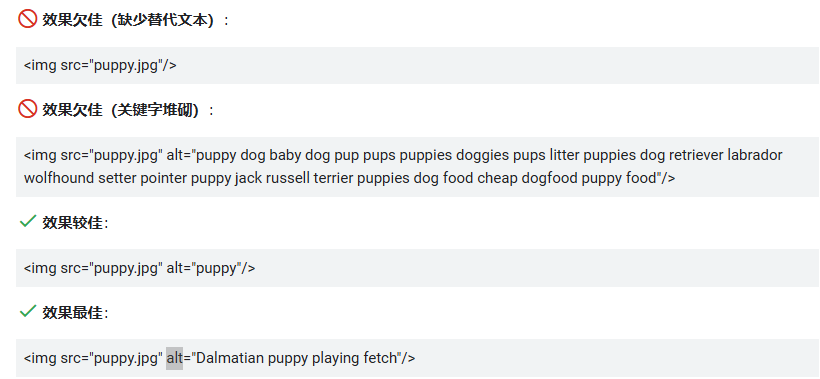
Keyword optimization: When writing Alt text, include keywords related to the image content. This not only helps search engines understand the image theme but also helps the webpage perform better in related search results.
Avoid keyword stuffing: Although keyword optimization is important, Alt text should be natural and descriptive, avoiding excessive keyword stuffing to ensure a balance between user experience and SEO effectiveness.
Best practices for implementing Alt tags:
Accurate description: Ensure Alt text accurately describes image content, avoiding generic terms or irrelevant information.
Avoid empty Alt attributes: For decorative images or purely visual elements, use empty Alt attributes (alt="") to indicate that these images are not part of the main content.
Maintain consistency: Throughout the website, ensure all important images have appropriately set Alt tags to ensure consistency and completeness in terms of SEO and accessibility.
Avoid punctuation: Avoid using punctuation in Alt text unless they are necessary, such as quotation marks or dashes, to distinguish specific information.
Descriptive Alt tags:

This Alt text clearly describes the subject in the image.
Alt tags for decorative images:

Here, an empty Alt attribute is used because this image is used for decoration rather than conveying important information.
Detailed Specifications:
1. Adding alt tags to images on webpages can help search engines identify image content;
2. Keywords included in alt attributes help improve the keyword relevance of webpages;
Example:
<img src="//aws-obg-image-lb-5.tcl.com/content/dam/brandsite/region/south-korea/blog/TCL-Android-TV-C725.png?t=1653461976138" alt="TCL Android TV C725"/>

Reference Website:
Official Google Explanation:
When providing additional metadata for images, the most important attribute is alternative text (text that describes the image), which also helps users who cannot see images on webpages access images better, including users using screen readers or users with low bandwidth connections.
Google combines alternative text with computer vision algorithms and page content to understand the subject of images. If you decide to use an image as a link, the image's alternative text can also function as anchor text.
When writing alternative text, create practical, informative content that appropriately uses keywords and aligns with webpage content. Please avoid abusing keywords in alt attributes (also known as keyword stuffing), as this leads to poor user experience and may cause your website to be viewed as a spam site.

In addition, consider accessibility of alternative text to comply with W3 guidelines. For <img> elements, you can add the alt attribute to the element; for embedded <svg> elements, you can use the <title> element. For example: