SEO Rules
Engine Specifications
- URL
- Schema.org Structured Data
- HTTP Status Codes
- Mobile Adaptation
- Core Web Vitals
- Hreflang Tags
- Noindex Tags
- JS Loading
SEO Elements
Website Content
A sitemap is a file in which you can provide information about the web pages, videos, or other files on your website, as well as the relationships between these contents. It is important in SEO, mainly reflected in the following aspects:
1. Improve Indexing Efficiency
Quickly discover pages: Sitemaps can help search engines quickly discover and crawl all important pages on your website, especially those that are not easily found through internal links.
Include new and updated pages: Through sitemaps, search engines can quickly learn about newly added pages and updates to existing pages, ensuring these pages are promptly crawled and indexed.
2. Provide Page Metadata
Additional information: Sitemaps can include metadata for each page, such as the last update time, page importance, and update frequency. This information can help search engines better understand and process these pages.
3. Improve Crawling Priority
Indicate important pages: Through sitemaps, you can clearly tell search engines which pages are most important and should be crawled first. This helps ensure the crawling and indexing of key pages.
4. Improve Website Structure
Provide website architecture information: Sitemaps can help search engines understand the overall structure of your website and the relationships between pages, enabling more efficient crawling and indexing of content.
5. Support Multiple Content Types
Multimedia content: Sitemaps can not only include web pages but also multimedia content such as images, videos, and news, helping search engines more comprehensively index all content on your website.
6. Enhance User Experience
Indirectly improve rankings: By optimizing sitemaps, improving page crawling and indexing efficiency, thereby enhancing search engines' overall evaluation of the website, ultimately helping to improve the website's ranking and visibility in search results.
How to Create and Submit a Sitemap
Generate sitemap: You can use various tools and plugins (such as Google XML Sitemaps, Yoast SEO, etc.) to automatically generate sitemaps.
Submit to search engines: After creating the sitemap, you can submit it to search engines through tools like Google Search Console to ensure search engines can timely obtain and use the sitemap information.
Example
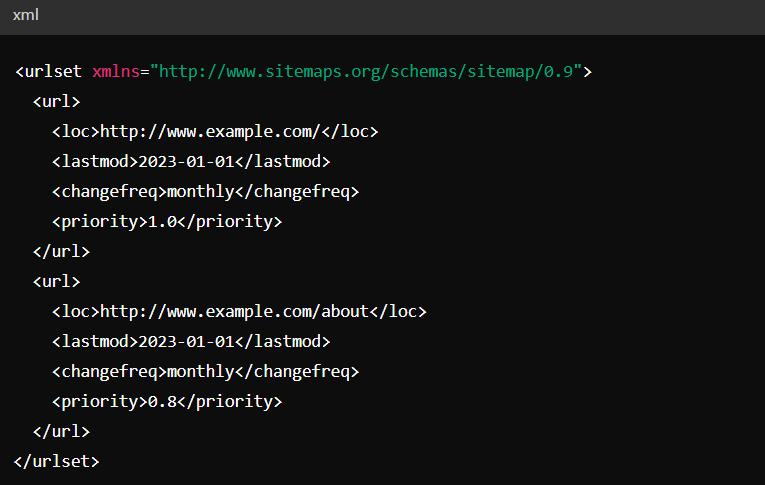
A typical sitemap example:

Detailed Specifications:
1. Sitemap File Format
XML format: Sitemaps typically use XML format, but can also use other formats such as TXT, RSS, Atom, etc.
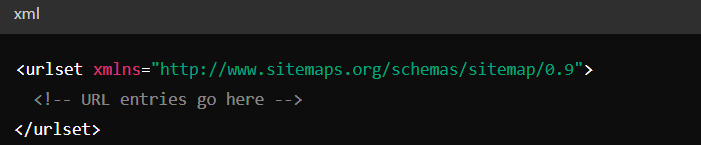
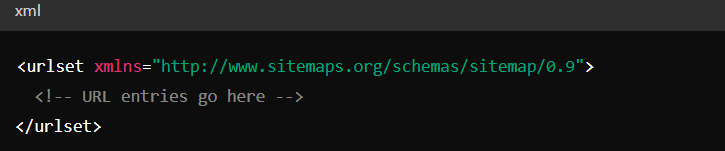
Root element: The root element of an XML sitemap file is <urlset>, and must specify the namespace.

2. URL Entries
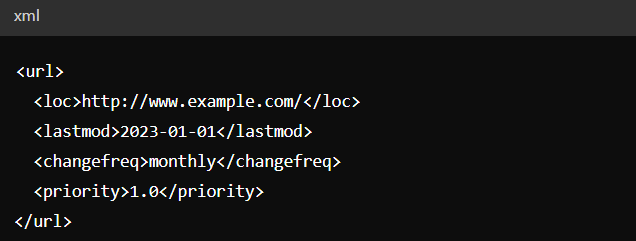
Each URL entry uses the <url> element and includes the following sub-elements:
loc (required): The absolute URL of the page.
lastmod (optional): The last modification time of the page.
changefreq (optional): The expected update frequency of the page content. Values can be: always, hourly, daily, weekly, monthly, yearly, never.
priority (optional): The priority of the page, ranging from 0.0 to 1.0.

3. File Size and URL Quantity Limits
File size: Each sitemap file must not exceed 50MB (uncompressed).
URL quantity: Each sitemap file can contain up to 50,000 URLs.
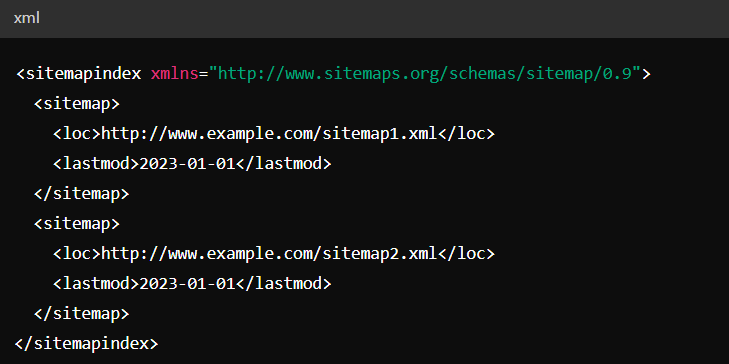
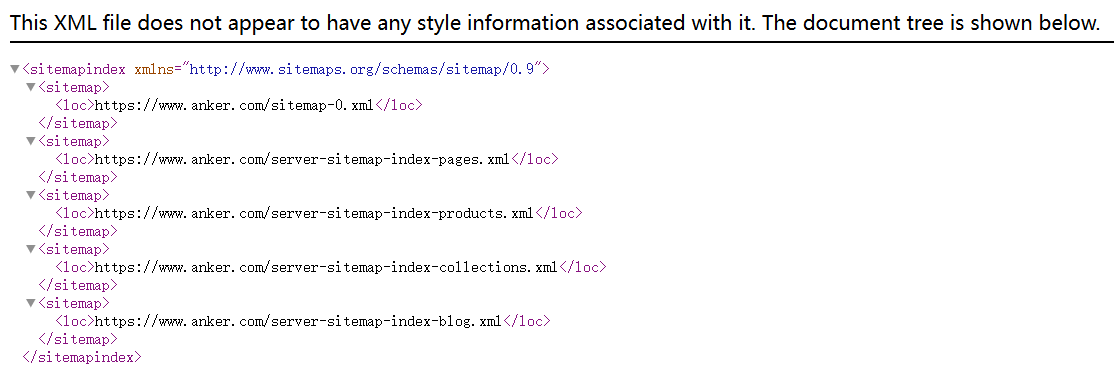
Multiple sitemaps: If the number of URLs to be listed exceeds the above limits, you can create multiple sitemaps and use a sitemap index file to list all the sitemaps.

4. URL Encoding
Encoding: Sitemaps must use UTF-8 encoding.
Special characters: Special characters in URLs must be appropriately escaped. For example, spaces should be represented as %20.
5. Namespace
The root element of the sitemap should include namespace declaration. For example, standard sitemaps use the following namespace:

6. Providing Sitemap Location
robots.txt file: Specify the location of the sitemap in the robots.txt file.

Submit to search engines: You can submit sitemaps through search engine tools (such as Google Search Console).
Reference Website:
Official Google Explanation:
Sitemaps tell search engines which web pages and files on your website you think are important, and also provide important information about these files. For example, when the web page was last updated and whether there are any alternative language versions.
You can use sitemaps to provide information about specific types of web content, including video, images, and news content. For example:
Sitemap video entries can specify the video's duration, rating, and suitable audience age groups.
Sitemap image entries can include the location of images contained in the webpage.
Sitemap news entries can include the article title and publication date.
1. Do you need a sitemap
If the web pages on your website are well linked, Google can usually discover most of them. Well linked means that all web pages you consider important can be reached through some form of navigation (such as your website's menu, or links placed in web pages). Even so, sitemaps can still help us more efficiently crawl larger, more complex websites or more special files. Sitemaps can help search engines discover URLs on your website, but do not guarantee that Google will crawl all content in the sitemap and index it. However, in most cases, your website will benefit from using sitemaps.
(1) You may need a sitemap in the following situations:
①Your website is very large. Generally speaking, on large websites, it is more difficult to ensure that every web page is linked by at least another web page. Therefore, Googlebot is more likely to fail to discover your new web pages.
②Your website is new and has few external links pointing to it. Googlebot and other web crawlers crawl web pages by following links between pages. Therefore, if no other websites link to your web pages, Googlebot may not discover your web pages.
③Your website contains a large amount of rich media content (video, images) or content displayed in Google News. Google can incorporate other information in sitemaps into search.
(2) You may not need a sitemap in the following situations:
①Your website is relatively "small" in scale. Scale refers to having no more than 500 web pages on your website. Only web pages you think need to be included in search results are counted toward this total.
②Your website is fully internally linked. This means Googlebot can find all important web pages on your website by following links from the homepage.
③You don't have many media files (video, images) or news web pages you want to display in search results. Sitemaps can help Google find and understand video and image files or news reports on your website. If you don't want these results to appear in Google search, you may not need a sitemap.
2. Sitemap Format

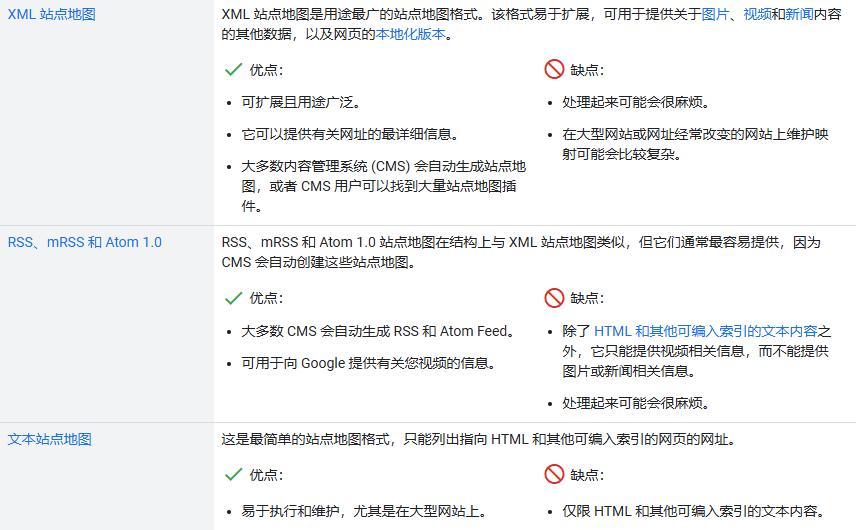
(1) XML Sitemap
XML sitemaps are the most widely used supported sitemap format. With Google-supported sitemap extensions, you can also provide more information about images, videos, and news content, as well as localized versions of web pages.
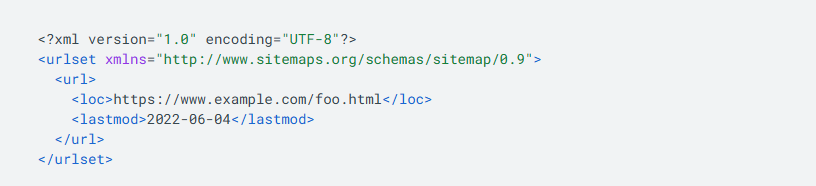
Below is a very basic XML sitemap containing only the location information of 1 URL:

You can find more complex examples and complete documentation on sitemaps.org.
Additional notes about XML sitemaps:
①Like all XML files, all tag values must be entity escaped.
②Google ignores <priority> and <changefreq> values.
③If the <lastmod> value is consistently accurate and verifiable (for example, by comparing with the page's last modification date), Google will use this value.
(2) RSS, mRSS and Atom 1.0
If your CMS generates RSS or Atom Feeds, you can submit the feed URL as a sitemap. Most CMS platforms create feeds for you, but note that such feeds only provide relevant information about recent URLs.
Additional notes about RSS, mRSS and Atom 1.0:
①Google supports RSS 2.0 feeds and Atom 1.0 feeds.
②You can use mRSS (media RSS) feeds to provide Google with details about video content on your website.
③Like all XML files, all tag values must be entity escaped.
(3) Text Sitemap
If you only want to provide web page URLs, you can create a simple text file (one URL per line) and submit that file to Google. For example, if you have 2 web pages on your website, you can add them to the sitemap as follows:

Additional notes about text file sitemaps:
①Do not add anything other than URLs to the sitemap file.
②You can name the text file whatever you want, but make sure its extension is .txt (for example, sitemap.txt).
3. Sitemap Best Practices
Sitemap best practices are defined by the sitemap protocol. The most overlooked best practices relate to size limits, sitemap location, and URLs included in the sitemap.
Sitemap size limits: Regardless of the format used, a single sitemap file must not exceed 50MB (uncompressed) and must not contain more than 50,000 URLs, otherwise the sitemap must be split into multiple smaller sitemaps. You can also choose to create a sitemap index file and then submit this index file to Google. You can submit multiple sitemaps and sitemap index files to Google. This may be useful if you want to track the search performance of individual sitemaps in Search Console.
Sitemap file encoding and location: Sitemap files must use UTF-8 encoding. You can host sitemaps anywhere on your website, but unless you submit the sitemap through Search Console, the sitemap will only affect subdirectories under the parent directory. Therefore, if the sitemap is published in the root directory of the website, it can affect all files on the website, so we recommend publishing the sitemap in this directory.
Properties of referenced URLs: Use fully qualified absolute URLs in the sitemap. Google will try to crawl the URLs you list. For example, if your website is located at https://www.example.com/, do not specify URLs like /mypage.html (relative URLs), but use the complete absolute URL: https://www.example.com/mypage.html.
Add URLs to the sitemap that you want to see in Google search results. Google typically displays canonical URLs in its search results, and you can influence this through sitemaps. If you provide different URLs for mobile and desktop versions of your web page, it is recommended to point to only one version in the sitemap. However, if you think it is necessary to point to both URLs, annotate the URLs to indicate which is the desktop version and which is the mobile version.
4. Submitting Sitemap to Google
Please note that submitting a sitemap only gives Google a hint: we cannot guarantee that Google will definitely download the sitemap or use the sitemap to crawl URLs on your website. You can submit sitemaps to Google through the following different methods:
①Submit sitemap in Search Console using the sitemap report. This way, you can see when Googlebot accessed the sitemap and any potential processing errors.
②Submit sitemaps programmatically using the Search Console API.
③Insert the following line anywhere in the robots.txt file, specifying the path of the sitemap. We will find the sitemap the next time we crawl the robots.txt file:

④If you use Atom or RSS, you can use WebSub to broadcast your changes to search engines including Google.