Home

Knowledge Academy

SEO White Paper

The Title tag is very important in SEO because it is the page title displayed in search engine results pages (SERP). By optimizing the Title tag, websites can effectively improve their visibility and click-through rate in search engines, thereby achieving better SEO results and user experience. The following are the importance and impact of the Title tag in SEO:

1. Key Description of Page Content

Information transmission: The Title tag is not just the name of the page; it should accurately and concisely describe the content and subject of the page. A good Title can attract user clicks and tell search engines the core theme of the page.

2. Improve Click-Through Rate

Attract clicks: In search results, the Title tag is the first impression for users to decide whether to click and visit the page. A relevant and attractive Title can attract more users to click, improve the page's click-through rate (CTR), which is also one of the search engine ranking factors.

3. Keyword Optimization

Keyword importance: The Title tag is one of the important locations for keyword optimization. Within reasonable limits, naturally including keywords in the Title can help search engines understand the theme and content of the page, improving rankings for related searches.

4. Improve User Experience

User expectations: Users can quickly understand the content of the page through the Title tag. If the Title is highly relevant to the actual content, the user experience will be better. This helps reduce bounce rate, increase user dwell time, and subsequently improve SEO results.

5. Balance Search Engine and User Needs

Balance optimization: The Title tag should consider both the algorithmic needs of search engines and user search intent. A good Title can meet SEO requirements while fully satisfying user information needs, improving page search visibility and user satisfaction.


Best Practices and Considerations

1. Length control: It is generally recommended to keep the Title length between 50-60 characters to ensure complete display in search results and attract user clicks.

2. Uniqueness: Each page's Title should be unique, reflecting its distinctive content and theme, avoiding repetitive or similar Title tags.

3. Keyword usage: When using keywords, they should be natural and meaningful. Do not overstuff keywords, to avoid being viewed as spam content by search engines.

4. Updates and optimization: Regularly check and optimize page Title tags, track their performance in search engine results, and adjust optimization strategies based on data.

The following are some practical suggestions on how to standardize Title tags:

1. Ensure accurate and attractive descriptions

Accurate content description: The Title tag should accurately reflect the content and theme of the page. Ensure the title is related to page content so that users can find the information they expect after clicking.

Attractive: In addition to accuracy, the Title tag should also have attractive characteristics to increase user click-through rate (CTR). Using attractive words or phrases, such as verbs, numbers, questions, etc., can attract more user clicks.

2. Control length and format

Length control: It is generally recommended to keep the Title length around 60 characters. This ensures complete display in search result pages and avoids truncation.

Formatting: Use symbols such as pipe (|), hyphen (-), colon (:) to separate different sections to improve readability and comprehension. For example:

or

3. Include keywords and geographic information (if applicable)

Keyword optimization: Naturally include primary keywords or keyword phrases in the Title. This helps search engines understand the theme and content of the page and improve rankings for related searches.

Geographic information: For businesses targeting specific geographic locations, geographic information can be included in the Title to improve local search effectiveness. For example:

4. Unique and orderly

Uniqueness: Ensure each page's Title tag is unique, avoiding repetitive or similar titles, which helps avoid SEO issues and confuse users.

Orderliness: Throughout the website, use consistent formats and structures to arrange Title tags so that search engines can better understand and index your website content.

5. Use tools for optimization and monitoring

SEO tools: Use SEO tools (such as Yoast SEO, SEMrush, etc.) to analyze and optimize your Title tags. These tools can provide keyword suggestions, length checks, and preview functions to help you optimize each page's Title.

Analysis and optimization: Regularly analyze Title tag performance and optimize based on search engine data and user feedback. Adjust title content and structure according to actual results to improve page click-through rates and rankings.


Detailed Specifications:
1. Title length: Page titles should be kept around 60 characters to ensure complete display in search results and attract user clicks;

2. Title accuracy: Titles should accurately describe page content so users can clearly understand the page's theme;

3. Avoid keyword stuffing;

4. Use the same language and writing system as the main content on the webpage (i.e., the text or letter system specified for that language).

5. Avoid adding time-sensitive information such as flight prices in the <title> element.


Example:

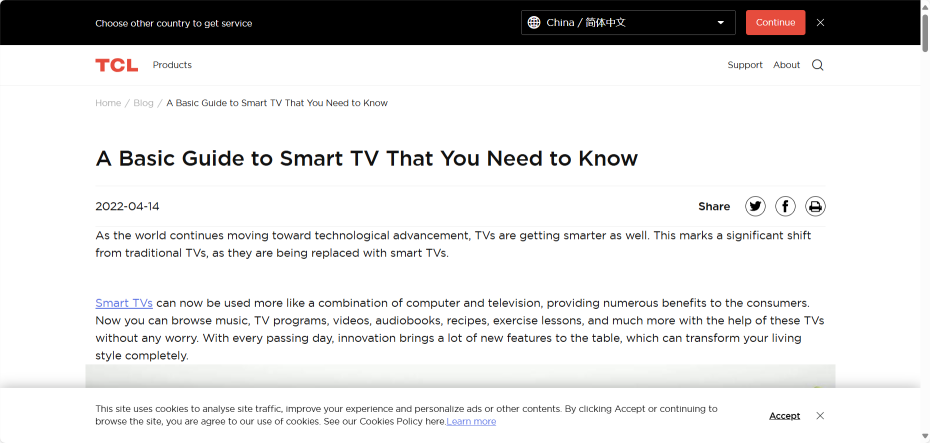
<title>A Basic Guide to Smart TV That You Need to Know</title>


Reference Website:


Official Google Explanation:


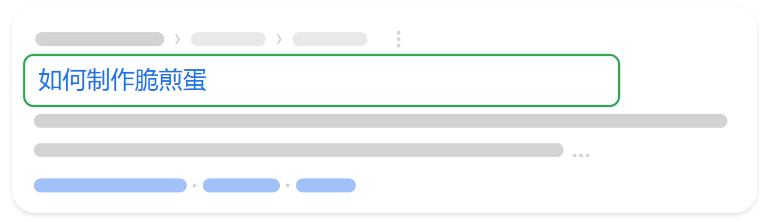
       "Title links" are the titles of search results that link to corresponding webpages on Google Search and other Google products and services (such as Google News). Google automatically determines title links based on many different pieces of information, but you can follow best practices to indicate your preferences.


1. Best Practices for Influencing Title Links

       Title links are very important as they allow users to quickly understand the content of a search result and why that result is relevant to their query. They are often the main information users refer to when deciding which result to click, so providing high-quality title text for your webpages is very important.

       (1) Ensure that you specify a title separately for each webpage on your website in the <title> element.
       (2) Write concise descriptive text for the <title> element. Avoid using vague descriptions, such as using "Home" for the homepage or "Profile" for someone's personal profile. Additionally, avoid unnecessarily long or verbose text in the <title> element. While there is no length limit for the <title> element, title links will be truncated in Google search results as needed, usually to fit the device width.
       (3) Avoid keyword stuffing. Including several descriptive words in the <title> element can sometimes be helpful, but do not repeatedly use the same words or phrases. Title text like "Foobar, foo bar, foobars, foo bars" is not helpful to users, and such keyword stuffing may cause Google and users to view your results as spam content.
       (4) Avoid repetitive or templated text in the <title> element. Each webpage's <title> element on your website must have unique text to describe the webpage content. For example, writing the title of every webpage of a business website as "Sell cheap products" would make it impossible for users to distinguish between two webpages. If the title in the <title> element is long and only has small variations ("template" title), it is also inappropriate; for example, if the common <title> element of all webpages contains text like "Band Name - Watch videos, lyrics, posters, albums, reviews and concerts," this title contains a lot of text with no reference value.
       One solution is to dynamically update the <title> element to better reflect the actual content of the webpage. For example, only use words like "video" and "lyrics" when the specific webpage contains videos or lyrics.

       (5) Concisely promote your brand in the title. The <title> element of the homepage can include additional information about the website, such as:


       However, if this text is displayed in the <title> element of every webpage on your website, it becomes repetitive and verbose when the system returns multiple webpages from the same website for the same query. In this case, you might consider adding the website name only at the beginning or end of each <title> element, separated from the rest of the text by separators such as hyphens, colons, or pipes, as follows:


       (6) Clearly indicate which text is the main title of the webpage. Google looks at various information when creating title links, including main visual titles, title elements, and other large prominent text. If multiple titles have the same visual weight and prominence, it can be confusing. Ensure your main title is distinct from other text on the webpage and prominently displayed in the most visible place on the webpage (for example, using larger font size, placing the title in the first visible <h1> element on the webpage, etc.).
       (7) Note issues regarding preventing search engines from crawling webpages. Using the robots.txt protocol on a website can prevent Google from crawling webpages, but it does not necessarily prevent webpages from being indexed. For example, if Google discovers your webpage through links on other websites, it may still index your webpage. If we cannot access the content on your webpage, we will rely on off-page content to generate title links, such as anchor text from other websites. You can use the noindex rule to prevent Google from indexing a particular URL.
       (8) Use the same language and writing system as the main content on the webpage (i.e., the text or letter system specified for that language). For example, if the webpage is written in Hindi, be sure to also write the <title> element in Hindi (do not write the title text in English or transliterate the title to Latin characters). Google will try to display title links that match the webpage's main language and writing system. If Google determines that the <title> element does not match the writing system or language of the webpage's main content, we may choose other text as the title link.
       (9) Avoid adding flight price information in the <title> element. When generating title links for flight pages, our system may not display price information. This is because flight prices can change rapidly (sometimes changing every few minutes), causing the price displayed in the title link to be inconsistent with the actual price on the landing page.


2. How Title Links Are Created in Google Search
       The process by which Google generates title links on Google search result pages is completely automated and considers both webpage content and citations to this webpage on the web. The goal of title links is to fully showcase and describe each search result.

       Google Search automatically determines title links based on the following information:

       (1) Content in the <title> element
       (2) Main visual title displayed on the webpage
       (3) Title elements, such as <h1> elements
       (4) Other content that has been styled to become larger and more prominent
       (5) Other text contained in the webpage
       (6) Anchor text on the webpage
       (7) Text in links pointing to the webpage
       (8) WebSite structured data


       Please note that Google must re-crawl and re-process the webpage to discover relevant updates to the above information, and this process can take anywhere from days to weeks. If you make changes, you can request Google to re-crawl your webpage.

       Although we cannot manually change title links for individual websites, we continue to work on enhancing their relevance. You can follow the best practices above to help improve the quality of title links we display for your webpages.


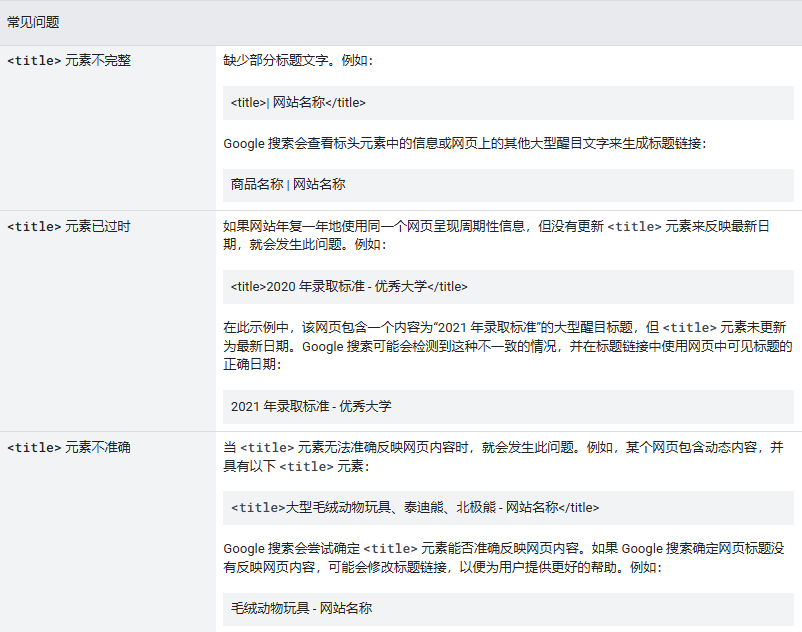
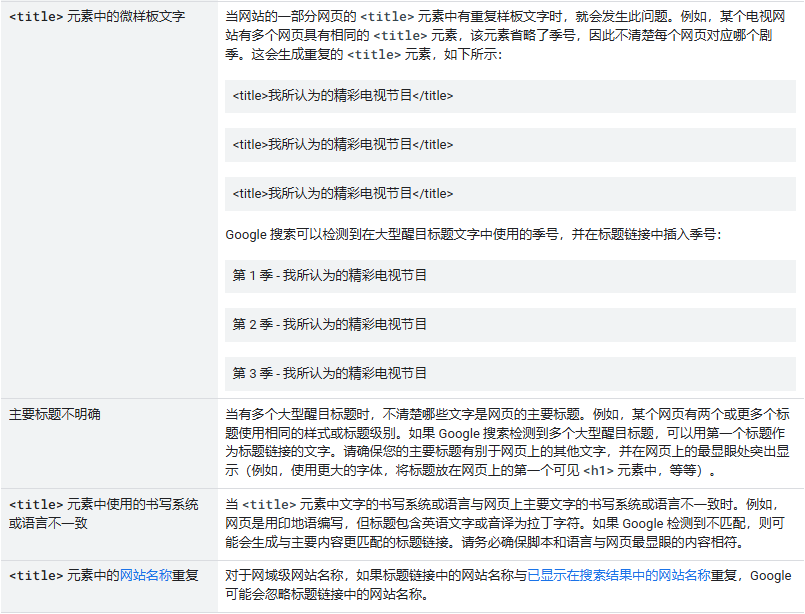
3. Common Issues and How Google Addresses Them