Home

Knowledge Academy

SEO White Paper

The Canonical tag plays an important role in SEO. It is mainly used to solve potential duplicate content issues on websites, helping search engines identify the main content pages, thereby improving overall search engine optimization effectiveness. By correctly using the Canonical tag, you can effectively optimize your website's structure and content management, improve page rankings in search engines and user experience. It is an important strategy in SEO optimization.

The following are the importance and role of the Canonical tag in SEO:

1. Solve duplicate content issues

Unified direction to main pages: When a website has multiple similar or duplicate content pages (such as product pages with different URL parameters or mobile and desktop versions of pages), the Canonical tag can specify a main URL as the preferred version for search engines, avoiding duplicate content being indexed and reducing the risk of ranking drops due to duplicate content.

2. Protect link equity

Concentrate link equity: By specifying the Canonical tag, you can ensure that search engines concentrate all link equity from related pages onto the main version. This helps improve the main page's ranking and search visibility, without affecting rankings due to link equity being dispersed among duplicate content.

3. Improve user experience

Reduce confusion and poor user experience caused by duplicate content: If users find multiple similar pages in search results, they may be confused or unsure which is most suitable for their needs. Through the Canonical tag, you can ensure they see the most relevant page, improving user satisfaction and page click-through rates.

4. SEO best practices

Avoid SEO issues: Unhandled duplicate content may cause search engines to view it as low quality or ranking manipulation. Using the Canonical tag can avoid these issues, ensuring your website performs well in search engine results.


Canonical tag usage specifications:

1. Tag position and syntax

Placement: The Canonical tag should be placed inside the <head> tag of HTML pages.

Syntax format: The tag's syntax format is as follows:

Where the href attribute specifies the URL of the main content page.

2. Choose the correct URL

Specify main version: Select a main URL as the Canonical version. This is usually the most comprehensive and representative page for the topic.

Avoid incorrect URLs: Ensure the href attribute of the Canonical tag points to a URL that actually exists and differs from other related pages, avoiding pointing to 404 pages or invalid URLs.

3. Handle different versions and parameterized URLs

Parameterized URLs: If multiple versions exist on your website generated through URL parameters (such as sorting, filtering, etc.), you can use the Canonical tag to specify a main version, for example:

Rather than having different URLs for each parameterized version.

Mobile and desktop versions: If your website has mobile and desktop versions of pages, ensure each page has the correct Canonical tag specified to avoid being seen as duplicate content.

4. Dynamically generated pages

Dynamically generated content: For pages with content dynamically generated through AJAX or JavaScript, ensure the Canonical tag correctly reflects the main version of the currently displayed content after page loading.

5. Regular review and updates

Maintain consistency: Regularly review Canonical tag settings, especially after website structure or content updates. Ensure they still point to the most accurate and relevant main version.

6. SEO tools and validation

Use tools for validation: Use SEO tools (such as Google Search Console) to validate Canonical tag settings, ensuring search engines correctly understand and process these tags.


Example:

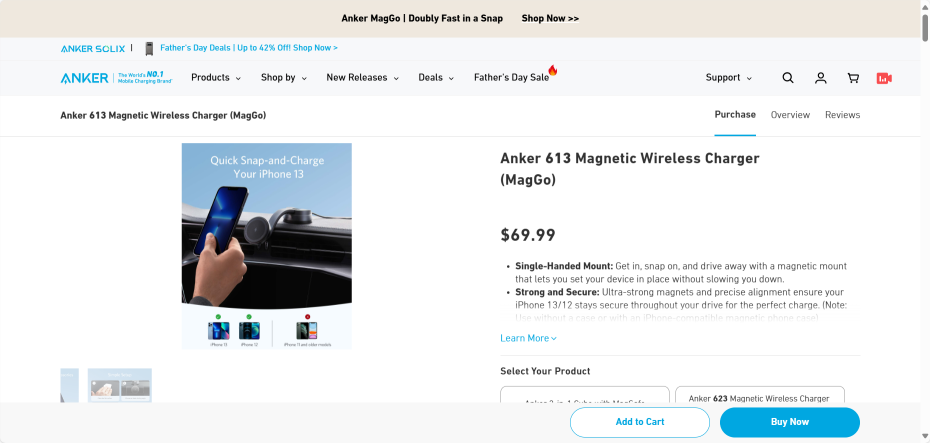
<link rel="canonical" href="https://www.anker.com/products/b2930"/>


Reference Website:


Official Google Explanation:


      To specify a canonical URL for duplicate or very similar web pages to Google Search, you can use multiple methods to indicate which URL you prefer to use. These methods are arranged by their strength of influence on canonicalization as follows:

      Redirect: Strong signal indicating the redirect target should become the canonical URL.
      rel="canonical" link annotation: Strong signal indicating the specified URL should become the canonical URL.
      Sitemap inclusion: Weak signal that helps the URL included in the sitemap become the canonical URL.


      Please note that these methods can be stacked, so combining them will be more effective. This means that if you use two or more methods, it will increase the likelihood of your preferred canonical URL appearing in search results.

      Although we recommend using these methods, it is not mandatory; even if you don't specify a preferred canonical URL, your website may still perform well. This is because if you don't specify a canonical URL, Google will objectively determine which version of the URL is most suitable for display to users in Google Search.


1. Reasons for specifying canonical URLs

      While specifying a preferred canonical URL is usually not important, you may want to clearly inform Google about the canonical page in a group of duplicate or similar web pages for various reasons:

      (1) Specify the URL you want users to see in search results. You may want users to access your green dress product page through https://www.example.com/dresses/green/greendress.html (rather than https://example.com/dresses/cocktail?gclid=ABCD).
      (2) Consolidate signals for similar or duplicate pages. Specifying a canonical URL helps search engines consolidate signals they have about each URL (such as links pointing to them) into one preferred URL. This means that signals from other websites to https://example.com/dresses/cocktail?gclid=ABCD will consolidate into links pointing to https://www.example.com/dresses/green/greendress.html (if that URL becomes the canonical URL).
     (3) Simplify tracking metrics for a piece of content. If specific content can be accessed through multiple URLs, it becomes more difficult to obtain comprehensive metrics for this content.
      (4) Avoid spending time crawling duplicate pages. You may want Googlebot to discover as much content as possible on your website, so it's better for Googlebot to spend time crawling new (or updated) pages on your website rather than duplicate versions of the same content.


2. Best Practices
      Regardless of which canonicalization method you use, please follow these best practices:

      (1) Do not use robots.txt files for canonicalization.
      (2) Do not use URL removal tools for canonicalization, as they hide all versions of the URL from search results.
      (3) Do not use different canonicalization methods to specify different canonical URLs for the same page (for example, do not specify one canonical URL for a page in the sitemap while using rel="canonical" to specify another canonical URL for the same page).
      (4) We do not recommend using noindex to prevent selecting canonical pages within a single website, as this completely prevents the page from appearing in Google search results. The rel="canonical" link annotation is the preferred solution.
      (5) If you are using hreflang elements, be sure to specify a canonical page in the same language; if there is no such canonical page, specify a canonical page in the best alternative language.
      (6) When providing links within your website, link to canonical URLs (not duplicate URLs). Always linking to your designated canonical URLs helps Google understand your preferred URLs.


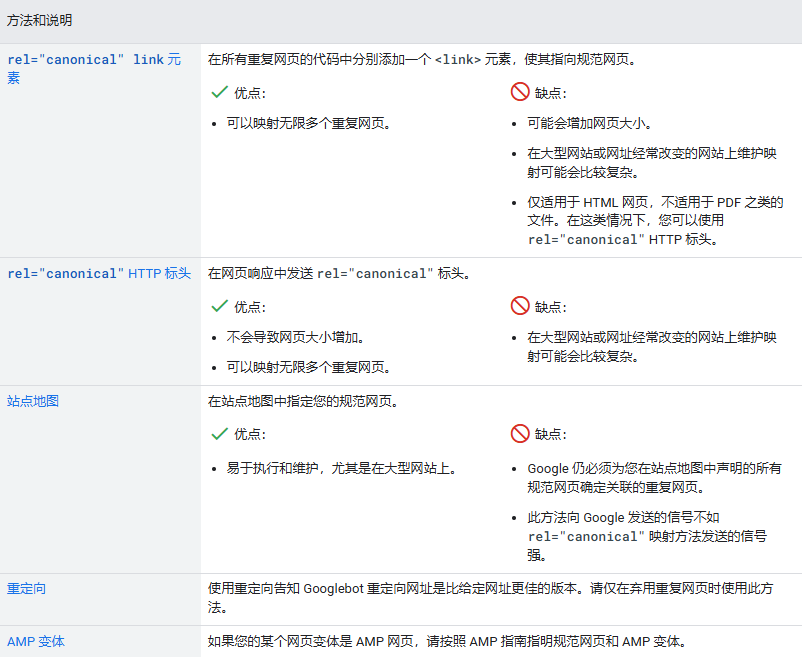
      Comparison between different canonicalization methods:


3. Using rel="canonical" link annotations
      Google supports rel canonical link annotations (as described in RFC 6596). You can provide rel="canonical" link annotations in two ways: (1) rel="canonical" link elements in HTML, (2) rel="canonical" link HTTP headers
      We recommend choosing one to use; simultaneously using both methods is more prone to errors when supported (for example, you might provide one URL in HTTP headers and another in rel="canonical" link elements).

      (1) rel="canonical" link elements
      The rel="canonical" link element (also known as the "canonical element") is an element used in the head section of HTML to indicate that another web page can represent the content on this page.

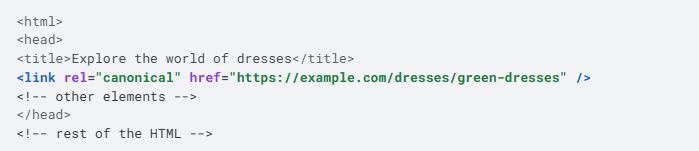
      Assuming you want to make https://example.com/dresses/green-dresses the canonical URL (even if there are many URLs pointing to this content), you can specify this URL as the canonical URL by performing the following steps:

      ①Add a <link> element with the rel="canonical" attribute to the <head> section of duplicate pages, making it point to the canonical page. For example:

      ②If the canonical page has a mobile variant with a different URL, add a rel="alternate" link element for it, making the link point to the mobile version of this page:

      ③Add appropriate hreflang or other elements for this page.

      For rel="canonical" link elements, use absolute paths (not relative paths). Although Google supports relative paths, relative paths may cause problems in the long term (for example, if you inadvertently allow crawling of your test website), so we do not recommend doing this.

      The rel="canonical" link element is only accepted when it appears in the <head> section of HTML, so please ensure that at least the <head> section is valid HTML.

      If you use JavaScript to add rel="canonical" link elements, be sure to properly inject the canonical link element.


      (2) rel="canonical" HTTP headers
      If you can change server configuration, you can use rel="canonical" HTTP headers (instead of HTML elements) to specify canonical URLs for documents supported by Google Search, including non-HTML documents such as PDF files.

      Currently, Google only supports this method in web search results.

      If you publish content in multiple file formats (such as PDF or Microsoft Word) and each has its own URL, you can return rel="canonical" HTTP headers to tell Googlebot which is the canonical URL for the non-HTML file. For example, to specify that the .docx version of a PDF version should be the canonical URL, you can add this HTTP header to the .docx version of the content:

      Like rel="canonical" link elements, use absolute URLs in rel="canonical" HTTP headers; according to RFC2616, only English double quotes can be used on both sides of the URL.