Home

Knowledge Academy

SEO White Paper

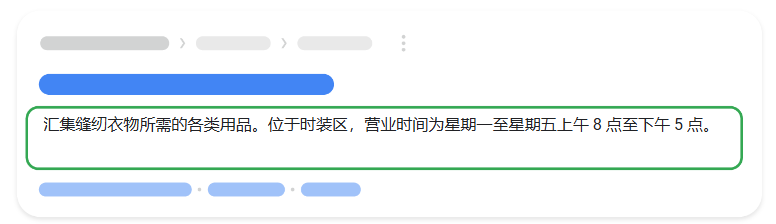
Description is also very important in SEO. Although it does not directly affect search engine rankings, it has an important impact on click-through rate (CTR) and user experience. Descriptions usually appear in search results as a brief summary of the page, helping users understand the page content, so editing a good description is crucial for attracting user clicks. The following are several key points about Description:

1. Ensure relevance to page content

Content relevance: The description should accurately reflect the theme and content of the page. Ensure the description can clearly convey the information provided by the page, allowing users to quickly understand the content and purpose of the page.

2. Attract user clicks

Appeal: Use compelling language or phrases to encourage users to click on your page link. The description should be concise, specific, and attractive, attracting users to learn more about the page content.

3. Include keywords

Keyword optimization: Naturally include primary keywords or keyword phrases in the description. Although description does not directly affect rankings, displaying keywords relevant to search queries in search results can increase page relevance and appeal.

4. Control length

Appropriate length: The length of description is generally recommended to be around 160 characters to ensure complete display in search engine results. Although search engines sometimes truncate longer descriptions, ensure key information is located in the front portion.

5. Provide uniqueness

Unique and precise: Each page's description should be unique, avoiding copy-paste or similar descriptions. This not only helps avoid SEO issues, but also provides users with clear expectations and experience.

6. Use call-to-action (Call to Action)

Call to action: If applicable, you can include a call-to-action in the description, such as "Click to learn more", "View now", etc., to encourage users to click on your page link.


Best practices and considerations

Regular optimization: Regularly check and optimize page descriptions, adjusting description content based on actual click-through rates and user feedback.

Do not stuff keywords: Descriptions should be natural and fluent, avoiding excessive keyword stuffing, to prevent being viewed as spam content by search engines.


Detailed Specifications:

1. Description character length should be around 160 characters to avoid being truncated due to excessive length;

2. Avoid using JavaScript injection form, recommend using HTML format display;

3. Google refers to tag content to generate summaries, using short and relevant summaries to inform users what specific web page content is and attract user interest.

4. Using relevant keywords in Description helps improve page rankings in search results. But ensure keyword usage is natural, do not overstuff.


Example:

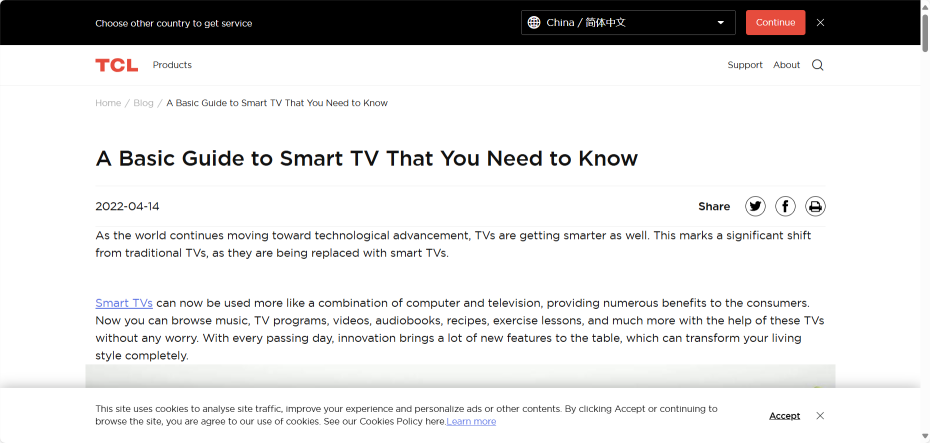
<meta name="description" content="Android TV and Google TV is the most commonly purchased smart TVs. Check the notable features of them from this article."/>


Reference Website:


Official Google Explanation:


       "Summary" refers to the description or summary portion displayed in search results for Google Search and other Google products and services (such as Google News). Google primarily determines appropriate summaries automatically based on webpage content. If the meta description element better describes the webpage compared to other content, we may also use the descriptive information in the meta description element.


1. How Summaries Are Created
       Summaries are automatically created by Google based on webpage content, designed to highlight and preview the webpage content most relevant to the user's specific search query; this means Google Search may display different summaries depending on the search query.

       Summaries are primarily created based on the webpage content itself. However, if the meta description HTML element can provide users with a more accurate description of the webpage compared to content directly obtained from the webpage, Google sometimes uses this element.


2. How to Prevent Summary Display or Adjust Summary Length
      You can prevent Google from creating summaries for your website and displaying them in search results, or let Google know your desired maximum summary length. To prevent Google from displaying summaries for your webpage in search results, use the nosnippet meta tag. To specify the maximum summary length, use the max-snippet:[number] meta tag. You can also use the data-nosnippet attribute to prevent certain parts of the webpage from appearing in the summary.


3. Best Practices for Creating Quality Meta Descriptions
       Google sometimes uses the <meta name="description"> tag on webpages to generate search result summaries because in these cases, Google believes that summaries generated this way can provide users with more accurate descriptions compared to summaries entirely from webpage content. Meta description tags typically use short and relevant summaries to inform users what specific webpage content is and attract user interest. They act like slogans, designed to convince users that the corresponding webpage is exactly what they are looking for. Meta descriptions have no length limit, but summaries in Google search results will be truncated when necessary, usually to fit device width.


4. Create Unique Descriptions for Each Webpage on Your Website
      If every webpage on your website uses the same or similar descriptions, these descriptions won't be very helpful when multiple webpages appear in search results simultaneously. Therefore, try to create descriptions that accurately summarize the specific webpage. You can use site-level descriptions on the homepage or other summary pages, and page-level descriptions on all other webpages. If you don't have time to create descriptions for each webpage separately, try to prioritize content; at least create descriptions for key URLs (such as the homepage and popular webpages).


5. Add Content-Related Information to Descriptions
       Meta descriptions don't have to be in sentence format and can also contain information about the webpage. For example, news or blog posts can list author, publication date, or attribution information. This provides highly relevant information to potential visitors, which wouldn't be displayed in summaries without this data. Similarly, product pages may contain some important information fragments scattered throughout the webpage, such as price, production date, manufacturer, etc. A good meta description can consolidate all this data together.

For example, the following meta description provides detailed information about a book, with each piece of information clearly labeled and separated:


6. Generate Descriptions Programmatically
       For certain websites (such as news media sources), generating accurate and unique descriptions for each webpage is very simple: since each article is hand-written, adding one more descriptive sentence requires little extra effort. For larger database-driven websites, such as product aggregation sites, hand-written descriptions are impossible to achieve. However, in the latter case, programmatically generating descriptions is more feasible, and it is recommended that you give it a try. Good descriptions should be simple to understand and not uniform. Page-level data is very suitable for programmatic generation.

       Please note that meta descriptions containing many long strings of keywords will not help users clearly understand webpage content and are unlikely to be displayed as summaries.

7. Use High-Quality Descriptions
       Ensure your descriptions are truly descriptive. Since meta descriptions do not appear on webpages that users see, this type of content is easily overlooked. However, high-quality descriptions appear in Google's search results and have a long-term positive effect on the quality and quantity of your search traffic.

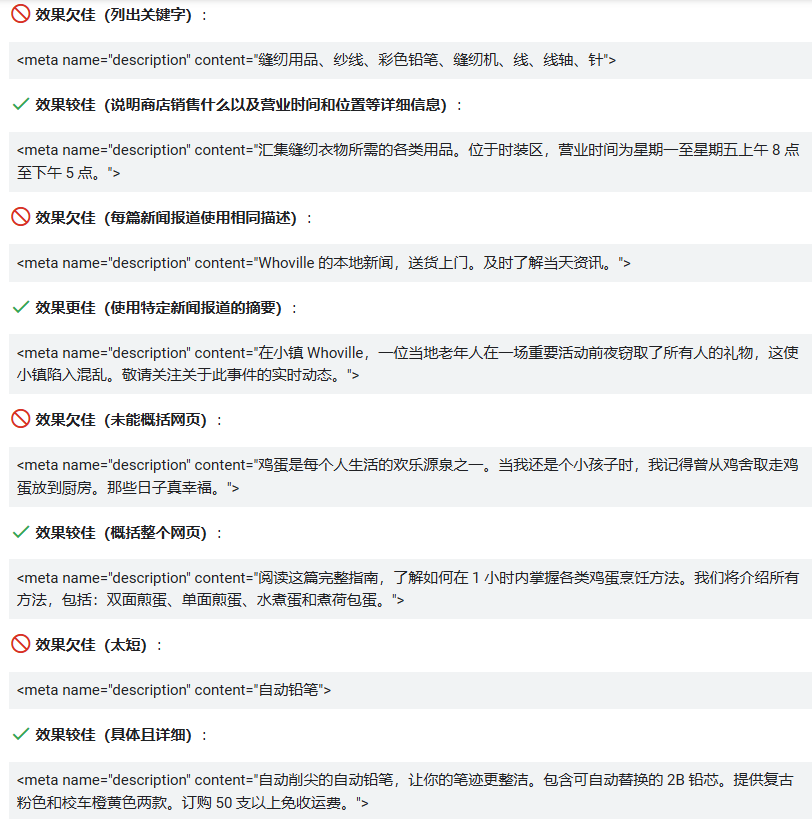
       The following lists some examples showing how to improve meta descriptions: