Home

Knowledge Academy

SEO White Paper

H tags (Header tags) are very important in SEO as they not only help search engines understand the structure and content hierarchy of a page, but also directly affect page rankings and user experience. The following are the importance and impact of H tags in SEO:

1. Structured content and keyword optimization

Page structuring: H tags (such as <h1>, <h2>, <h3>, etc.) are used to define the titles and subtitles of a page. They help search engines understand the hierarchical structure of page content, thus better indexing and presenting the page.

Keyword optimization: Including keywords naturally in H tags helps clearly indicate to search engines the theme and focus of the page. For example, <h1> is typically used for the main title and should contain the page's primary keywords.

2. User experience and content readability

Clear and concise: Good use of H tags not only helps search engines but also improves user reading experience. Clear and concise title structure allows users to quickly understand the main content and structure of the page.

Increased page dwell time: Users can quickly browse the page's title structure, find content of interest, thereby increasing page dwell time, which is also beneficial for SEO.

3. SEO best practices

Uniqueness and relevance: Each page should have a unique and relevant <h1> tag for the main title. Subtitles (<h2>, <h3>, etc.) should be used reasonably according to content hierarchy, avoiding overuse or unnecessary tags.

Avoid abuse and keyword stuffing: H tags should naturally and meaningfully contain keywords, rather than excessively stuffing keywords. This practice may be viewed by search engines as spam content or ranking manipulation.

4. Improve page search visibility

Indexing and ranking: Search engines determine the importance and relevance of a page by analyzing the content structure in H tags. Well-optimized H tags can help pages be better indexed and ranked by search engines, improving visibility in relevant search results.


Detailed Specifications:
1. Google search result titles will reference the H1 tag content of the webpage;
2. Important content related to keywords on the webpage can be modified using H1;
3. A webpage should have only one group of H1 tags;
4. Use H2, H3... tags sequentially according to the webpage content hierarchy and importance to enhance the level and significance of webpage content;


Example:

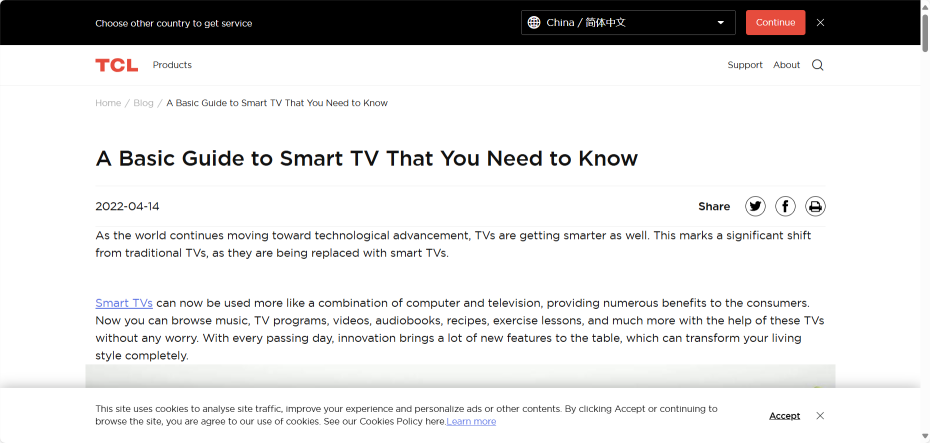
<h1 class="news-title">A Basic Guide to Smart TV That You Need to Know</h1>


Reference Website:


Official Google Explanation:

      Google looks at various information when creating title links, including main visual titles, title elements, and other large prominent text. If multiple titles have the same visual weight and prominence, it can be confusing. Please ensure your main title is distinct from other text on the webpage and prominently displayed in the most visible place on the webpage (for example, using larger font size, placing the title in the first visible <h1> element).


Headings: <h1>-<h6>


      There are six heading elements: <h1>, <h2>, <h3>, <h4>, <h5> and <h6>. Each heading represents one of six heading levels, with <h1> being the highest or most important level and <h6> being the lowest level.

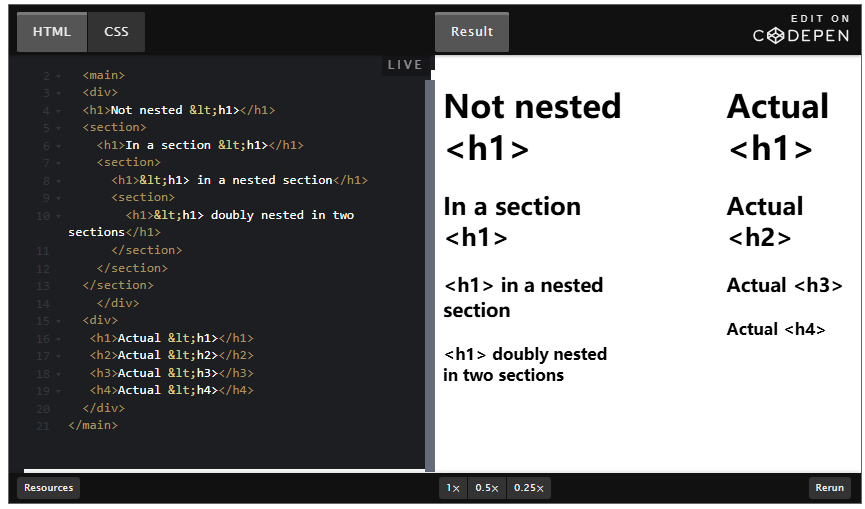
      If a heading is nested within a document banner <header>, it is the title of the application or website. When nested in <main>, regardless of whether it's nested in the <main>'s <header>, it is the header of that webpage, not the entire website. When nested in <article> or <section>, it is the title of that subsection of the page.


      It is recommended to use heading levels similar to those in text editors: use <h1> as the main title, <h2> as the subtitle for subsections, and <h3> if these subsections contain parts;

      For users employing screen reading software, a common navigation method is jumping from one heading to another to quickly determine the page's content. Therefore, do not skip one or more heading levels. Doing so may cause confusion, leaving users puzzled about where the missing headings are.

      Incorrect usage:

      Correct usage: