SEO Rules
Engine Specifications
- URL
- Schema.org Structured Data
- HTTP Status Codes
- Mobile Adaptation
- Core Web Vitals
- Hreflang Tags
- Noindex Tags
- JS Loading
SEO Elements
Website Content
Images play an important role in SEO. Through optimization, they can improve webpage rankings and visibility in search engines, while enhancing user experience and enriching page content, thus positively impacting SEO. The following are the impact and importance of image-related content on SEO:
1. Number of images
Content richness: Webpages containing rich, relevant images can enhance user experience and the comprehensiveness of page content, thus having a positive impact on SEO.
Diversity: Diverse images can enrich page content, attract more user interactions and sharing, indirectly promoting website traffic growth.
2. Average image size
Webpage loading speed: Image size directly affects webpage loading speed. Larger images increase page loading time, and webpage speed is one of Google's important search ranking factors. Therefore, optimizing image size and format is part of improving webpage speed and SEO effectiveness.
3. Alt tags
Search engine understanding: Alt tags help search engines understand image content, as search engines cannot directly recognize image content but understand images through text provided by Alt tags. Well-optimized Alt tags can increase image visibility and rankings in search engine results.
Accessibility: Alt tags are also important for website accessibility, helping visually impaired users understand image content on the page.
Detailed Explanation:
1. Number of Images
By comprehensively considering image quantity, quality, and optimization measures, you can optimize webpage performance and SEO effectiveness while enhancing user experience, thus achieving better search engine rankings and user satisfaction. The importance of image quantity to SEO mainly manifests in the following aspects:
1. User experience
Enhance content richness: An appropriate number of images can enrich webpage content, making pages more attractive and readable, thus enhancing user experience. This helps reduce bounce rates and increase user stay time on the website, indirectly affecting SEO.
Visual appeal: High-quality images can attract user attention, enhance user understanding and interest in content, and improve overall user experience.
2. Page loading speed
Affect page loading speed: Too many images may significantly increase page loading time, which has negative effects on user experience and SEO. Page loading speed is an important search engine ranking factor, and slower loading speeds may result in lower search engine rankings.
Optimize image quantity: By reasonably controlling image quantity, you can provide sufficient visual content without affecting page loading speed, thus balancing user experience and page performance.
3. Content relevance
Enhance content relevance: Relevant images can help search engines understand page content and improve content relevance. This has positive effects on search engine content indexing and ranking.
Enhance page theme: Appropriate and relevant images can enhance the expression of the page theme, helping search engines better understand and categorize page content.
4. Image optimization
Use of Alt tags: Each image should include descriptive Alt tags, which help search engines understand image content and improve visibility in image search results.
Filename and description: Use filenames and descriptions containing keywords to further enhance image relevance and SEO effectiveness.
Recommendations for implementing image optimization
Use images appropriately: Use images reasonably according to content needs, avoiding too many or too few. Ensure each image has a clear purpose and relevance.
Optimize image size: Use compression tools to reduce image file size, improving page loading speed while ensuring image quality.
Use lazy loading: For longer pages, you can use lazy loading technology to delay loading images outside the viewport, thus improving initial page loading speed.
Image Alt tags and filenames: Add descriptive Alt tags to each image and use filenames containing keywords to enhance image SEO effectiveness.
2. Average Image Size
The importance of average image size to SEO mainly manifests in webpage loading speed and user experience. The following are the impact and importance of average image size on SEO:
1. Webpage loading speed
Search engine ranking factor: Search engine algorithms have confirmed that webpage loading speed is one of the important factors affecting search rankings. Slower-loading webpages may be penalized, affecting their rankings in search results.
Mobile-first indexing: With Google promoting mobile-first indexing, webpage loading speed on mobile devices is particularly important. Fast-loading webpages typically perform better in mobile search results.
2. User experience
Affect user behavior: Fast-loading webpages can enhance user experience, reduce bounce rates, increase user stay time and page views, all of which are important signals that search engines use to evaluate webpage quality.
Mobile device friendliness: Mobile device users are typically more sensitive to page loading speed, so optimizing image size is crucial for enhancing mobile user experience.
3. SEO best practices
Comprehensive consideration: Optimizing image size is part of SEO optimization, which can help reduce the overall page size, improve loading speed, thus meeting search engine best practice requirements.
Recommendations for implementing image size optimization:
1. Choose appropriate image format: Select suitable formats according to image content, such as JPEG for color photos or complex images, PNG for icons and transparent images.
2. Individual image size: Individual image file size should be controlled between dozens of KB to hundreds of KB. Specific size depends on image content and quality requirements. For most cases, if images exceed 1MB, optimization may be needed.
3. Overall page image size: The total size of all images on an entire page should typically not exceed 1MB, especially for mobile device users, lighter pages can load faster, improving user experience and SEO performance.
4. Responsive design consideration: For responsive design pages, provide appropriately optimized images according to different device resolutions and viewport sizes. This means multiple sizes and resolutions of images may be needed to accommodate different devices and screen sizes.
5. Compression and optimization: Regardless of image size, compression tools should be used to optimize images to ensure good visual quality while reducing file size. Many online tools and software can help achieve this goal, such as TinyPNG, JPEG Optimizer, etc.
6. Loading speed optimization: It is important to ensure all resources on the page, including images, can load quickly. Fast-loading pages help improve user satisfaction and are an important factor in search engine rankings.
3. Alt Tags
Alt tags are very important in SEO, especially in optimizing image search and improving webpage accessibility. By correctly using Alt tags, you can not only optimize your website's SEO performance but also enhance webpage accessibility, thus improving user experience and increasing traffic sources. The following are the importance and role of Alt tags in SEO:
1. Image search optimization
Describe image content: Alt tags provide textual descriptions for search engines, helping search engines understand and index image content. Search engines cannot directly understand image content, and Alt text can provide key information for them.
Increase traffic sources: Well-optimized Alt tags can make images more discoverable in Google Images and other image search engines, thus increasing the website's traffic sources.
2. Enhance webpage accessibility
Assistive technology support: For visually impaired users or users using assistive technologies, Alt tags are an important means for them to understand and browse page content. Properly setting Alt tags can enhance webpage accessibility, providing all users with a better user experience.
3. SEO best practices
Keyword optimization: When writing Alt text, include keywords related to the image content. This not only helps search engines understand the image theme but also helps the webpage perform better in related search results.
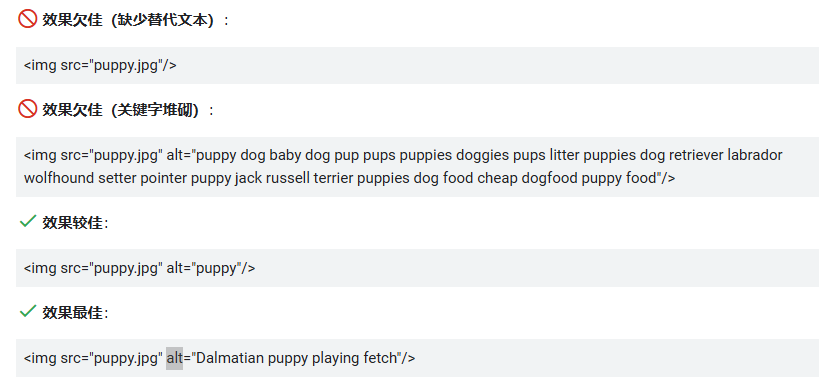
Avoid keyword stuffing: Although keyword optimization is important, Alt text should be natural and descriptive, avoiding excessive keyword stuffing to ensure a balance between user experience and SEO effectiveness.
Best practices for implementing Alt tags:
Accurate description: Ensure Alt text accurately describes image content, avoiding generic terms or irrelevant information.
Avoid empty Alt attributes: For decorative images or purely visual elements, use empty Alt attributes (alt="") to indicate that these images are not part of the main content.
Maintain consistency: Throughout the website, ensure all important images have appropriately set Alt tags to ensure consistency and completeness in terms of SEO and accessibility.
Avoid punctuation: Avoid using punctuation in Alt text unless they are necessary, such as quotation marks or dashes, to distinguish specific information.
Descriptive Alt tags:

This Alt text clearly describes the subject in the image.
Alt tags for decorative images:

Here, an empty Alt attribute is used because this image is used for decoration rather than conveying important information.
Example:
<img src="//aws-obg-image-lb-5.tcl.com/content/dam/brandsite/region/south-korea/blog/TCL-Android-TV-C725.png?t=1653461976138" alt="TCL Android TV C725"/>

Reference Website:
Official Google Explanation:
When providing additional metadata for images, the most important attribute is alternative text (text that describes the image), which also helps users who cannot see images on webpages access images better, including users using screen readers or users with low bandwidth connections.
Google combines alternative text with computer vision algorithms and page content to understand the subject of images. If you decide to use an image as a link, the image's alternative text can also function as anchor text.
When writing alternative text, create practical, informative content that appropriately uses keywords and aligns with webpage content. Please avoid abusing keywords in alt attributes (also known as keyword stuffing), as this leads to poor user experience and may cause your website to be viewed as a spam site.

In addition, consider accessibility of alternative text to comply with W3 guidelines. For <img> elements, you can add the alt attribute to the element; for embedded <svg> elements, you can use the <title> element. For example: