Home

Knowledge Academy

SEO White Paper

Hreflang tags are very important for SEO, especially for websites targeting multiple languages and regions. It is an HTML tag used to indicate to search engines different language or region versions of a page, ensuring that users see the correct page suitable for their language and region in search results. Here are the importance of Hreflang tags for SEO and their implementation methods:

Importance

1. Language and Region Targeting:

Multilingual Websites: For websites offering multiple language versions, Hreflang tags help search engines identify and display the correct version suitable for user language preferences.

Multi-Region Targeting: For websites serving multiple regions, Hreflang tags help search engines identify and display the correct version suitable for user regional preferences.

2. Avoiding Duplicate Content Penalties:

Without proper Hreflang tag support, search engines may treat the same content in multiple languages or regions as duplicate content, leading to decreased search rankings.

3. Improving User Experience:

Users can more easily find content in their understood language or region, enhancing user satisfaction and retention rates.

4. Search Engine Rankings:

Search engines can more accurately present the correct language and region version of pages to users, which helps improve page rankings in searches related to specific languages and regions.

Implementation Methods

Hreflang tags can be added to the <head> section of a web page, specifying different language or region versions of the current page. Here are the basic methods for implementing Hreflang tags:

The hreflang attribute specifies the language or region code of the page (combination of ISO 639-1 language codes and ISO 3166-1 Alpha-2 region codes).

The href attribute specifies the URL of the corresponding version of the page.

Multi-language and Multi-region Scenarios

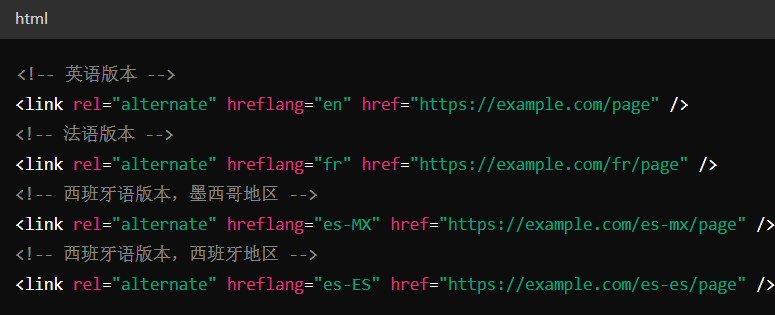
In multi-language and multi-region scenarios, multiple Hreflang tags can be added to the header of each page so that search engines can understand and identify all available versions of the page. For example:

Tips and Considerations

Consistency and Accuracy: Ensure that the language and region codes in Hreflang tags correspond consistently and accurately to the actual language and region of the page.

Bidirectional Links: For each language or region version of the page, ensure that the corresponding pages also contain Hreflang tags pointing to other language or region versions.

Google Search Console: Use the "International Targeting" feature in Google Search Console to verify the correctness of Hreflang tags and monitor the multilingual and multi-region SEO performance of your website.

Detailed Specifications:

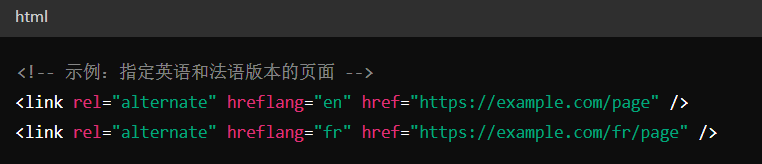
1. It is recommended to add <link rel="alternate" hreflang="lang_code"... > elements in the webpage header;

2. The format of hreflang is <link rel="alternate" hreflang="lang_code" href="url_of_page" />, the first code is the language code (using ISO 639-1 format), the second code (using ISO 3166-1 Alpha 2 format) represents the region code of the alternate URL;

3. URLs in hreflang must be fully qualified URLs, including the transfer method (http/https);

4. When any other language/region does not match the user's browser settings, the system will use the reserved value x-default;

5. Each webpage needs to display complete alternate URLs for all languages and regions; if two webpages do not point to each other mutually, the system will ignore the related tags;


Example:

<link rel="alternate" hreflang="x-default" href="https://www.tcl.com/global/en/tvs/4k-tv"> 
<link rel="alternate" hreflang="en" href="https://www.tcl.com/global/en/tvs/4k-tv"> 
<link rel="alternate" hreflang="ar-sa" href="https://www.tcl.com/sa/ar/tvs/4k-tv"> 
<link rel="alternate" hreflang="tr-tr" href="https://www.tcl.com/tr/tr/tvs/4k-tv"> 


Reference Website:


Official Google Explanation:

       If your webpage provides multiple versions for different languages or regions, inform Google about these different variants. This way, Google Search can guide users who want to visit your webpage by language or region to the most appropriate version.

       Please note that even if you don't take the above measures, Google may still find other language versions of your webpage, but it's usually recommended that you explicitly specify the webpages you provide for specific languages or regions.

       Here are some suggested examples of indicating alternate webpages:

       1. Display the main content of the webpage in a single language, only translating parts of the template, such as navigation and footer sections. Webpages with user-generated content (such as forums) typically adopt this approach.
       2. The webpage uses a single language to provide similar content to users in different regions, with very subtle regional differences in content. For example, you may have English content targeting users in the United States, the United Kingdom, and Ireland.
       3. Website content has been completely translated into multiple languages. For example, each of your webpages has German and English versions.
       If the main content of a webpage has not been translated, the localized version of that webpage will only be considered as its duplicate webpage.


1. Methods of Indicating Alternate Webpages

       You can indicate multiple language/region versions of a webpage to Google through the following three methods: HTML, HTTP Headers, Sitemap
       From Google's perspective, these three methods are equivalent, and you can choose the method most suitable for your website. Although you can use all three methods simultaneously, it won't bring any benefits to your webpage's performance in Google Search (in fact, managing three implementations is much more difficult than choosing just one implementation).

       Use hreflang to inform Google about your content variants so we understand that these webpages are localized variants of the same content. Google does not use hreflang or HTML lang attributes to detect the language of webpages; we use algorithms to determine the webpage's language.

       Guidelines for All Methods:
       Each language version must list itself and all other language versions.
       The URLs of alternate webpages must be fully qualified URLs, including the transfer method (http/https), for example: https://example.com/foo, not //example.com/foo or /foo
       The URLs of alternate webpages do not need to be located in the same domain.
       If you have multiple alternate URLs targeting users of the same language but in different regions, then you'd better provide a generic URL for users of that language with unclear geographical location. For example, if you provide specific URLs for English users in Ireland (en-ie), Canada (en-ca), and Australia (en-au), provide a general English version (en) webpage for users in the United States, the United Kingdom, and all other English-speaking regions. You can also choose one of your specific webpages as a generic webpage.
       If two webpages do not point to each other mutually, the system will ignore the related tags. This is to ensure that a user on another website cannot arbitrarily designate that website as an alternate version of your webpage by creating a tag.
       If it's difficult for you to maintain a complete set of bidirectional links for each language separately, you can omit some languages on certain webpages; Google will still process those webpages that point to each other mutually. However, please be sure to establish bidirectional links between newly added language webpages and source language/main language webpages. For example, if you initially created your website in French with .fr URLs, when you add webpages targeting Mexico (.mx) and Spain (.es), you should prioritize establishing bidirectional links between these two new webpages and the highly visible .fr webpage, rather than establishing bidirectional links between these two newly added Spanish variant webpages (.mx and .es).
       Consider adding fallback webpages for unmatched languages, especially on language/country/region selectors or on homepages that automatically redirect. Use the x-default value: <link rel="alternate" href="https://example.com/" hreflang="x-default" />


(1) HTML Markup
       You can inform Google of all language and region variants of a webpage by adding <link rel="alternate" hreflang="lang_code"... > elements in the webpage header. This method is very useful if you don't have a sitemap or cannot specify HTTP response headers for your website.

       For each variant of the webpage, add a set of <link> elements in the <head> element, with each link corresponding to a webpage variant (including the webpage itself). These links should be identical in each version of the webpage. See other guidelines.

       Here is the syntax for each link element:

       Place the <link> tags near the top of the <head> element. At a minimum, the <link> tags must be located within a properly formatted <head> section, or before any items that might cause the <head> to end prematurely (such as <p> or tracking pixels). If unsure, paste the code from the rendered webpage into an HTML validation tool to ensure the links are located within the <head> element.

       Example:
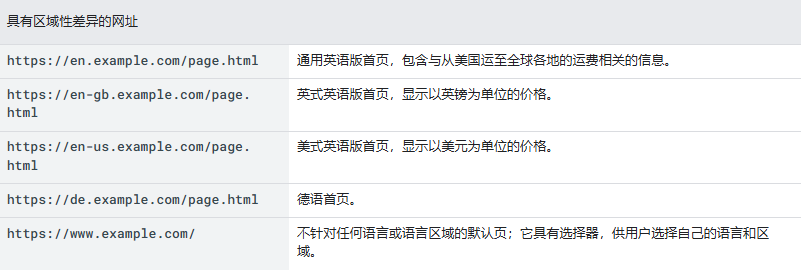
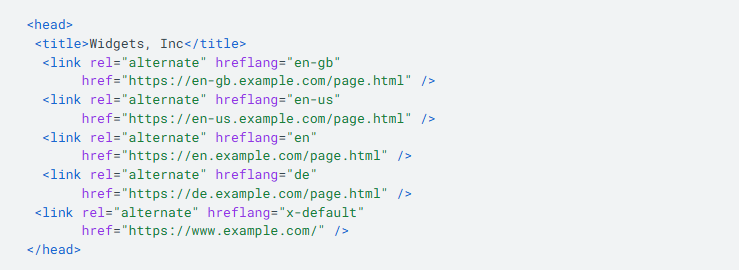
       For example, Widgets, Inc has a website targeting users in the United States, the United Kingdom, and Germany. The following URLs contain roughly the same content but have regional differences:

       Please note that Google will not determine the target audience of webpages based on language-specific subdomains (en, en-gb, en-us, de) in these URLs; you must explicitly associate webpages with their corresponding target audiences.

       The <head> section of all webpages listed in the table "URLs with Regional Differences" above contains the following HTML code. This guides American English, British English, generic English, and German users to the corresponding localized webpages, and all other users to the generic homepage. Google Search returns appropriate results to users based on their browser settings.


(2) HTTP Headers

       You can return HTTP headers containing the GET response of a webpage to inform Google of all language and region variants of the corresponding webpage. This method is useful for non-HTML files (such as PDF).

       Header format is as follows:

       You must specify a set of comma-separated <url>, rel="alternate" and hreflang values for each version of the webpage (including the requested version) separately, as shown in the following example. The Link: headers returned by each version of the webpage should be identical. See other guidelines.

       Example:
       Below is an example of a Link: header returned by a website with 3 versions of a PDF file, targeting English users, German users in Switzerland, and all other German users respectively:


(3) Sitemap
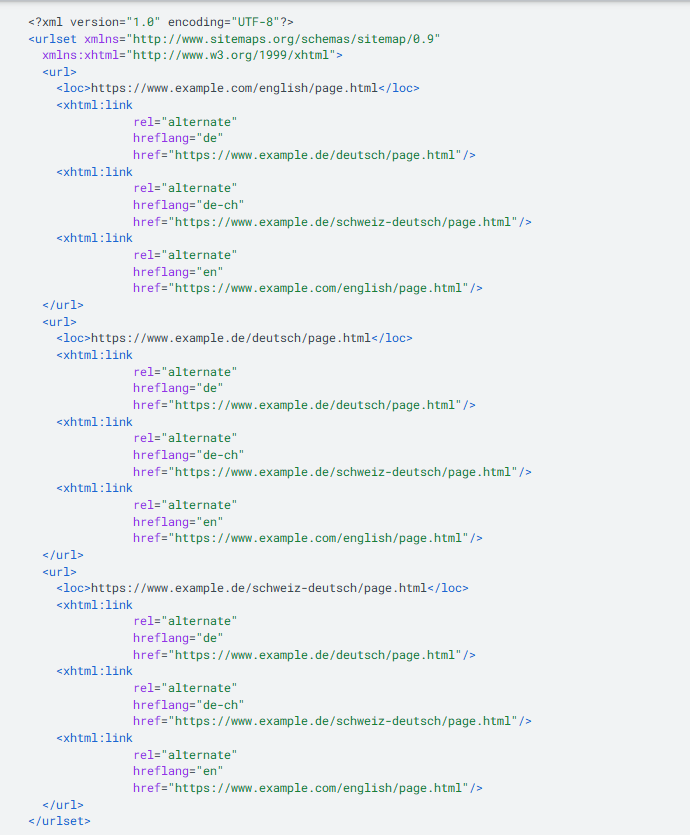
       You can use an XML sitemap to inform Google of all language and region variants of each URL. To do this, add a <loc> element specifying a single URL, with sub <xhtml:link> entries listing each language/region variant of the webpage (including the webpage itself). Therefore, if a webpage has 3 versions, the sitemap will have URL entries corresponding to each version, and each entry contains 3 identical subentries.

       Sitemap rules:

      ① Specify the xhtml namespace as follows:

       ②Create a separate <url> element for each URL, just like any other sitemap.
       ③Each <url> element must contain a <loc> subelement indicating the webpage URL.
       ④Each <url> element must contain a subelement <xhtml:link rel="alternate" hreflang="supported_language-code">, which should list each alternate version of the webpage (including the webpage itself). The order of these sub <xhtml:link> elements doesn't matter, but you might want to keep them in the same order to facilitate error checking. Subelements are not counted toward the URL upper limit count of the sitemap.
       ⑤Upload the sitemap to a directory on your website where the sitemap can be applied. Please note that the sitemap can only contain descendant URLs of the directory hosting the sitemap.
       ⑥Our sitemap documentation also applies to sitemap extensions. Be sure to follow the regular sitemap guidelines.

       Example:
       Below is an English webpage targeting global English users, which has two equivalent versions targeting German users globally and German users in Switzerland respectively. All URLs in the website are as follows:

       www.example.com/english/page.html targets English users.
       www.example.de/deutsch/page.html targets German users.
       www.example.de/schweiz-deutsch/page.html targets German users in Switzerland.
       Here is the sitemap for these 3 webpages: