SEO Rules
Engine Specifications
- URL
- Schema.org Structured Data
- HTTP Status Codes
- Mobile Adaptation
- Core Web Vitals
- Hreflang Tags
- Noindex Tags
- JS Loading
SEO Elements
Website Content
The importance of average image size to SEO mainly manifests in webpage loading speed and user experience. The following are the impact and importance of average image size on SEO:
1. Webpage loading speed
Search engine ranking factor: Search engine algorithms have confirmed that webpage loading speed is one of the important factors affecting search rankings. Slower-loading webpages may be penalized, affecting their rankings in search results.
Mobile-first indexing: With Google promoting mobile-first indexing, webpage loading speed on mobile devices is particularly important. Fast-loading webpages typically perform better in mobile search results.
2. User experience
Affecting user behavior: Fast-loading webpages can enhance user experience, reduce bounce rate, increase user stay time and page views, all of which are important signals that search engines use to evaluate webpage quality.
Mobile device friendliness: Mobile device users are typically more sensitive to page loading speed, so optimizing image size is crucial for enhancing mobile user experience.
3. SEO best practices
Comprehensive consideration: Optimizing image size is part of SEO optimization, which can help reduce the overall page size, improve loading speed, thus meeting search engine best practice requirements.
Recommendations for implementing image size optimization:
1. Choose appropriate image format: Select suitable formats according to image content, such as JPEG for color photos or complex images, PNG for icons and transparent images.
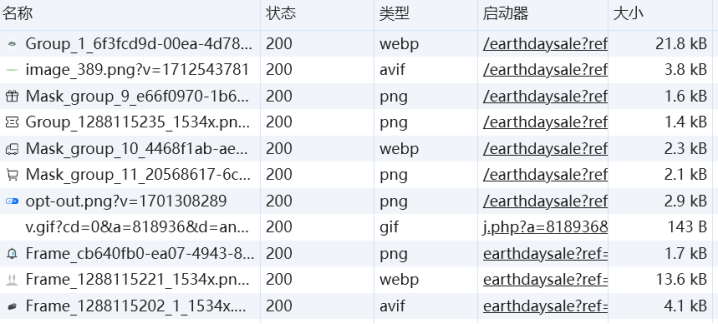
2. Individual image size: Individual image file size should be controlled between dozens of KB to hundreds of KB. Specific size depends on image content and quality requirements. For most cases, if images exceed 1MB, optimization may be needed.
3. Overall page image size: The total size of all images on an entire page should typically not exceed 1MB, especially for mobile device users, lighter pages can load faster, improving user experience and SEO performance.
4. Responsive design consideration: For responsive design pages, provide appropriately optimized images according to different device resolutions and viewport sizes. This means multiple sizes and resolutions of images may be needed to accommodate different devices and screen sizes.
5. Compression and optimization: Regardless of image size, compression tools should be used to optimize images to ensure good visual quality while reducing file size. Many online tools and software can help achieve this goal, such as TinyPNG, JPEG Optimizer, etc.
6. Loading speed optimization: It is important to ensure all resources on the page, including images, can load quickly. Fast-loading pages help improve user satisfaction and are an important factor in search engine rankings.
Detailed Specifications:
1. Optimizing image size in webpages helps improve webpage loading speed and optimize enhancement of webpage core metrics;
Example:

Reference Website: