SEO Rules
Engine Specifications
- URL
- Schema.org Structured Data
- HTTP Status Codes
- Mobile Adaptation
- Core Web Vitals
- Hreflang Tags
- Noindex Tags
- JS Loading
SEO Elements
Website Content
The standardization, readability, and friendliness of web page links (URLs) are crucial for SEO. By maintaining consistency, conciseness, descriptiveness, and readability of URLs, you can improve search engine crawling and indexing efficiency, enhance page relevance rankings, and strengthen user experience. This not only helps with search engine optimization but also enables users to better understand and navigate website content.
1. Link Standardization
Consistency: Ensure all links in the website are consistent, such as avoiding mixed case usage, inconsistent use of relative or absolute paths, etc. Maintaining consistency can avoid duplicate content issues, concentrate authority, and improve search engines' evaluation of pages.
Conciseness: Links should be as concise as possible, avoiding excessive parameters and complex structures. Concise links are easier for search engines to crawl and index, and are also easier for users to understand and remember.
2. Link Readability
Clear Description: Links should contain clear descriptions of page content, avoiding meaningless characters or numbers. For example, example.com/article/seo-tips is more meaningful than example.com/article/12345.
Keyword Usage: Using keywords related to page content in URLs helps search engines understand page topics and improves relevance rankings.
3. Link Friendliness
Static URLs: Try to use static URLs instead of dynamic URLs. Static URLs (such as example.com/seo-tips) are easier for search engines to crawl and users to understand than dynamic URLs (such as example.com/page.php?id=123).
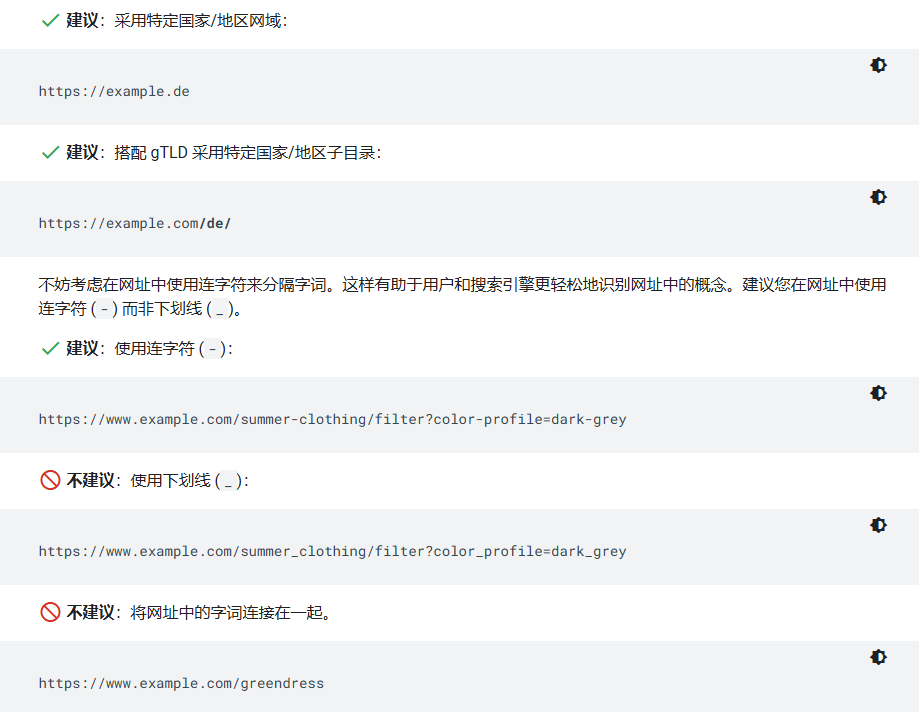
Separators: Use hyphens (-) instead of underscores (_) as word separators, as search engines treat hyphens as spaces, while underscores do not.
4. Link Structure
Hierarchical Structure: Links should reflect the hierarchical structure of the website to make it logically clear. For example, a blog post link could be example.com/blog/seo-tips, where blog is the category and seo-tips is the article title.
Avoid Being Too Long: Overly long URLs are not only difficult to remember, but may also be truncated in some browsers and search engines. Try to keep URL length within 100 characters.
5. Link Clickability
Descriptive Link Text: Use descriptive link text (such as "Learn more SEO tips") instead of "click here", which not only improves user experience but also helps search engines understand the content of the link destination.
Internal Links: Use internal links reasonably to help users and search engines navigate the website. Internal links should use keywords related to the target page as anchor text.
Best Practices for Standardization, Readability, and Friendliness
(1) Keep URL structure simple and clear
Avoid using meaningless parameters and symbols.
Use hyphens to separate words.
(2) Use Related Keywords
Include main keywords of the page in the URL to improve relevance.
For example: example.com/seo-tips instead of example.com/page1.
(3) Ensure Links Are Descriptive
Links should accurately reflect page content, making it easy for users and search engines to understand.
For example: example.com/services/web-design is better than example.com/services/service1.
(4) Avoid Dynamic Parameters
Try to use static URLs, avoiding dynamic URLs containing numerous parameters.
For example: example.com/product/widget is better than example.com/product?id=12345.
(5) Unify Link Formats
Ensure all link formats are consistent to avoid duplicate content.
For example: choose to uniformly use example.com or www.example.com, avoiding both coexisting.
(6) Properly Use Internal Links
Internal links should use keywords related to the target page as anchor text to help search engines understand page content.
For example: use "Learn about our SEO services" to link to the SEO services page, rather than "click here".
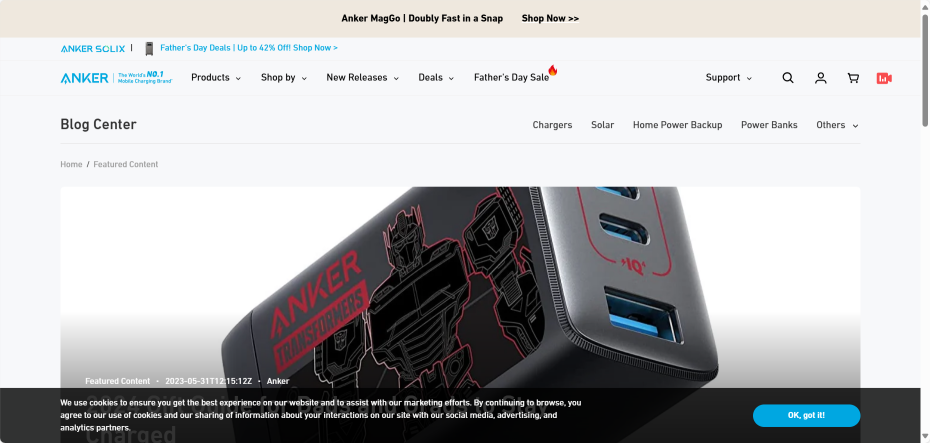
Example:
https://www.anker.com/blogs/featured-content
Reference URL:
Official Google Explanation:
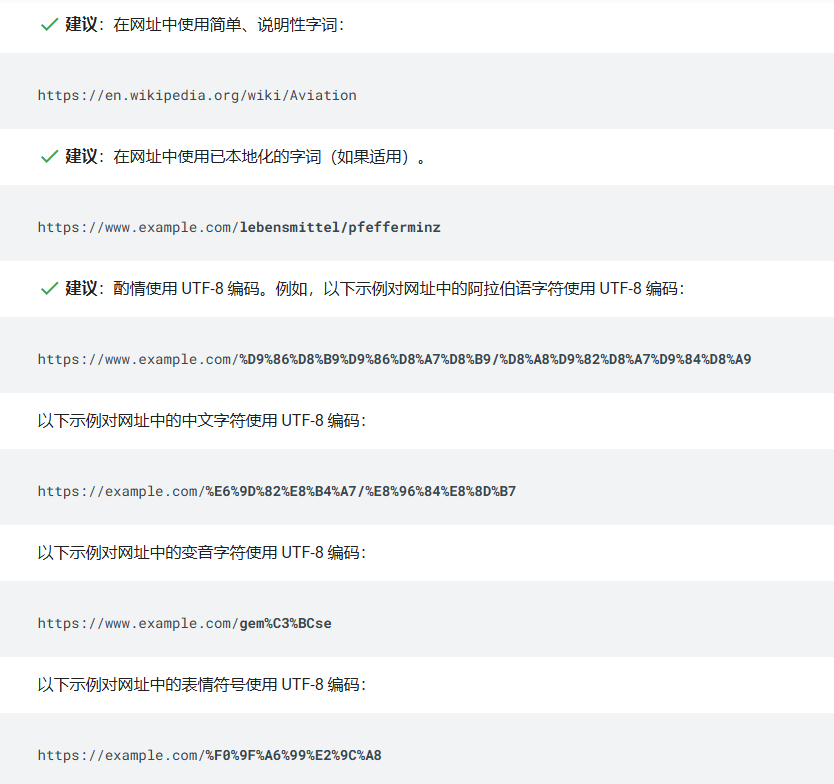
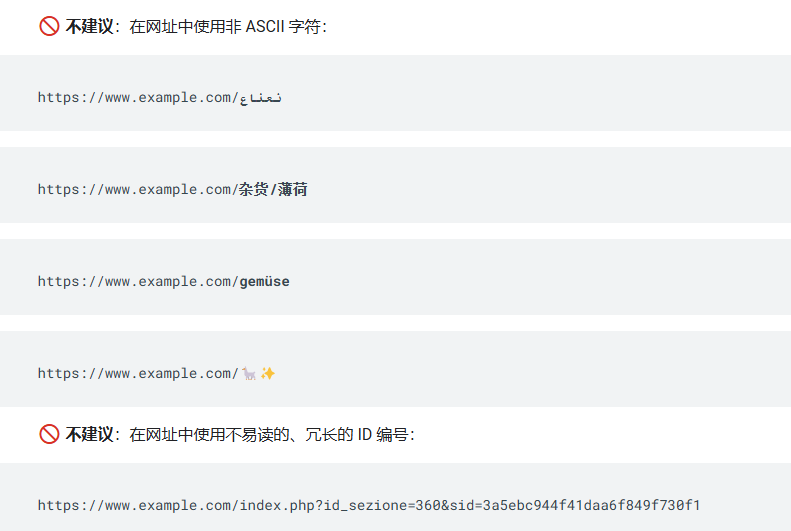
Google supports URLs defined in RFC 3986. All characters defined as reserved by this standard must be percent-encoded. Non-reserved ASCII characters can remain unencoded. Additionally, characters outside the ASCII range should be encoded in UTF-8.
Use readable words in URLs wherever possible, rather than lengthy ID numbers.


If your website is a multi-regional website, consider using a URL structure that facilitates geographical targeting of your website.

Common URL-Related Issues
Overly complex URLs, especially those containing multiple parameters, can cause problems for crawlers as they may generate a large number of unnecessary URLs that all point to the same or similar content on your website. Googlebot may therefore consume unnecessary bandwidth or may be unable to fully index all content on the website.
There may be multiple reasons for URL proliferation, including:
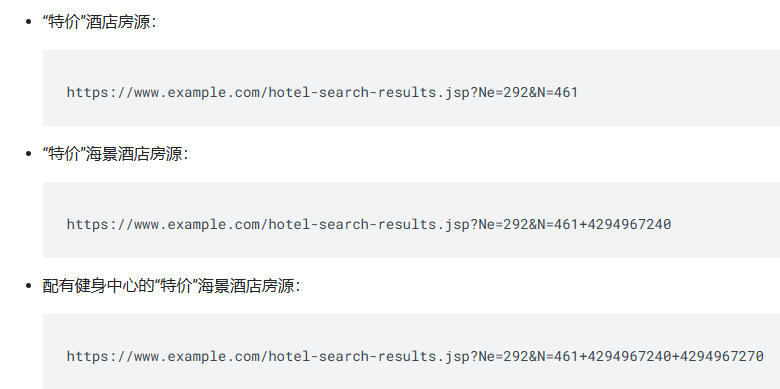
(1) Cumulative filtering of a set of items. Many websites provide different views for the same set of items or search results, usually allowing users to filter the set using specified criteria (for example: showing ocean view hotels). When filtering conditions can be combined in cumulative mode (for example: ocean view hotels with fitness centers), the number of URLs (data views) in the website increases dramatically. Since Googlebot only needs to view a small number of lists to access each hotel's webpage, there's no need to create numerous hotel lists with minor differences. For example:

(2) Dynamically generated documents. Minor variations may result from counters, timestamps, or advertisements.
(3) Problematic parameters in URLs. For example, session IDs may generate large amounts of duplicate content and more URLs.
(4) Sorting parameters. Some large shopping websites offer multiple ways to sort the same products, causing a significant increase in URL numbers.
(5) Irrelevant parameters in URLs, such as referral parameters.
(6) Calendar issues. Dynamically generated calendars may generate links pointing to future and past dates without start or end date restrictions. For example:

(7) Broken relative links. Broken relative links often lead to infinite space. This problem is usually caused by repeated path elements.
Resolving URL-Related Issues
To avoid problems that URL structures may cause, it is recommended that you take the following measures:
(1) Create a simple URL structure. It is recommended that you organize your content so that the URL structure is logical and particularly easy for humans to understand.
(2) Consider using the robots.txt file to block Googlebot from accessing problematic URLs. In general, consider blocking dynamic URLs, such as those that generate search results or infinite spaces (such as calendars). Regular expressions in robots.txt files can easily intercept large numbers of URLs.
(3) As much as possible, avoid using session IDs in URLs, and consider using Cookies instead.
(4) If your web server treats uppercase and lowercase text in URLs the same way, convert all text to the same case so that Google can more easily determine that the corresponding URLs refer to the same webpage.
(5) Remove unnecessary parameters and keep URLs as short as possible.
(6) If your website has calendars without expiration dates, add the nofollow attribute to links pointing to dynamically created future calendar pages.
(7) Check your website for broken relative links.