SEO Rules
Engine Specifications
- URL
- Schema.org Structured Data
- HTTP Status Codes
- Mobile Adaptation
- Core Web Vitals
- Hreflang Tags
- Noindex Tags
- JS Loading
SEO Elements
Website Content
JavaScript loading has an important impact on SEO, mainly reflected in aspects such as crawling capability, page speed, rendering issues, and SEO friendliness. By using server-side rendering, pre-rendering, optimizing JavaScript code, and ensuring key content is directly visible, the page's crawling and indexing effectiveness can be improved, enhancing SEO performance. Regularly monitoring and testing page performance, and adjusting optimization strategies in a timely manner, are key to ensuring that JavaScript loading has a positive impact on SEO. The impact of JavaScript loading on SEO is mainly reflected in the following aspects:
1. Crawlability
Crawling Capability: Search engines (such as Google) can crawl and execute JavaScript, but this may require more time and resources. Although Google is powerful in this regard, other search engines (such as Bing, Yahoo, DuckDuckGo) may not perform as well as Google in handling JavaScript.
Delayed Crawling: Due to the dynamic nature of JavaScript, search engines may delay crawling and indexing JavaScript-generated content. This causes new content or updated content to take longer to be indexed.
2. Visibility
Hidden Content: If the main content of a page is loaded through JavaScript, and search engines do not correctly execute JavaScript when crawling, this content may not be indexed. This directly affects the page's ranking.
Key Content: Ensure key content is immediately visible when the page loads, rather than being completely dependent on JavaScript. This can be achieved by using server-side rendering (SSR) or static generation (SSG) techniques.
3. Page Speed
Loading Time: Large amounts or complex JavaScript can increase page loading time, affecting user experience and page speed scores. Slower page speed affects search engine crawling efficiency and user satisfaction, thereby indirectly affecting SEO.
Code Optimization: By compressing and merging JavaScript files, asynchronously loading non-critical JavaScript, and reducing JavaScript code that blocks rendering, page loading speed can be improved.
4. Rendering Issues
Dynamic Rendering: When search engines crawl pages, if JavaScript fails to execute correctly, it may cause page content to fail to render completely. This affects search engines' understanding and indexing of page content.
Pre-rendering: Using pre-rendering techniques, such as Prerender.io, to pre-render JavaScript-generated pages into static HTML helps search engines crawl and index.
5. SEO Friendliness
Internal Links: Ensure that internal links generated through JavaScript can be crawled and followed by search engines. Use standard HTML <a> tags instead of binding links through JavaScript events.
Metadata: Ensure all key SEO metadata (such as title, description, Open Graph tags, etc.) is immediately visible when the page loads and does not rely on JavaScript for dynamic generation.
Implementing Best Practices
1. Server-Side Rendering (SSR) and Static Generation (SSG)
Use frameworks such as Next.js and Nuxt.js for server-side rendering or static generation, ensuring page content is generated on the server side rather than relying on client-side JavaScript.
This can ensure search engines crawl complete page content, enhancing SEO effectiveness.
2. Delayed Loading and Lazy Loading
For non-critical JavaScript, use delayed loading or lazy loading techniques to reduce initial page loading time.
This can improve page speed, enhance user experience, and thereby indirectly improve SEO.
3. Pre-rendering
Use Prerender.io or similar tools to pre-render JavaScript-generated pages into static HTML for search engine crawling.
Ensure search engines can crawl complete content, enhancing page indexing effectiveness.
4. Optimizing JavaScript
Compress and merge JavaScript files, reducing HTTP request counts.
Use asynchronous loading (async or defer attributes) to ensure JavaScript does not block initial page rendering.
5. Focus on Key Content
Ensure key content is directly visible in HTML rather than completely relying on JavaScript for dynamic generation.
This ensures content is immediately visible when the page loads, enhancing search engine crawling and indexing efficiency.
6. Monitoring and Testing
Use Google Search Console and other SEO tools to regularly monitor page crawling and indexing status.
Through testing tools (such as Google's Lighthouse or PageSpeed Insights), check the impact of JavaScript on page speed and SEO, and optimize accordingly.
Detailed Specifications:
1. Important tags on web pages, such as: title, canonical, etc., are not recommended to be loaded using JavaScript;
2. Ensure web page content can be loaded normally, and use rich results test or URL inspection tools to check;
3. Pay attention to preventing soft 404 status;
4. When loading important content, provide corresponding access permissions to Googlebot;
Example:
<script src="/_next/static/chunks/webpack-f91db86dfa97c972.js" async=""></script>
<script>(self.__next_f=self.__next_f||[]).push([0])</script>
Reference Website:
Official Google Explanation:
If you suspect JavaScript issues may cause your web page or specific content on JavaScript web pages to not appear in Google search results, follow these steps.
1. To test how Google crawls and renders URLs, use the rich results test or URL inspection tool in Search Console. You can view loaded resources, JavaScript console output and exceptions, rendered DOM, and more information. Warning: Do not use cached links to debug web pages. It is recommended to use the URL inspection tool instead, as it checks the latest version of the web page.
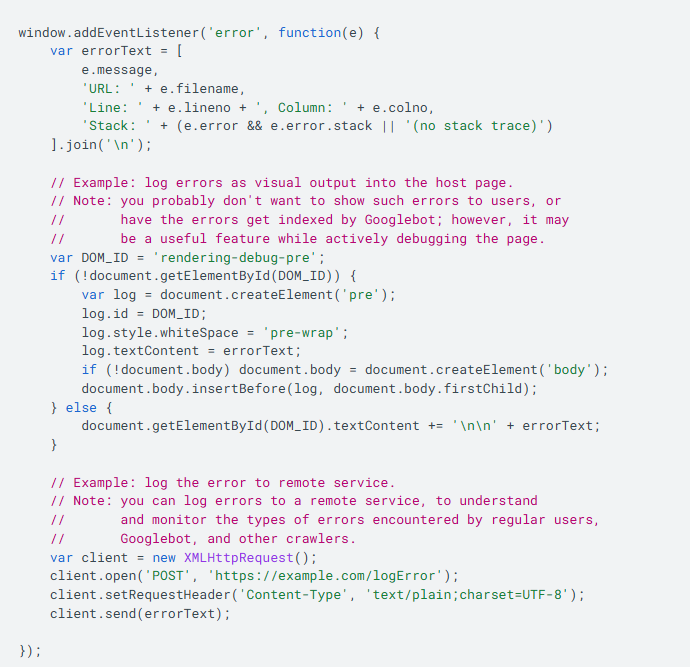
Additionally, we recommend collecting and auditing JavaScript errors that users (including Googlebot) encounter on your website, identifying potential issues that may affect content rendering.
The following example demonstrates how to log JavaScript errors recorded in the global onerror handler. Note that certain types of JavaScript errors (such as parsing errors) cannot be logged using this method.

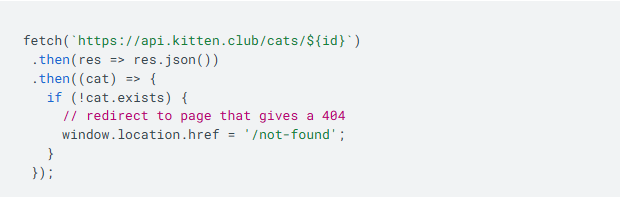
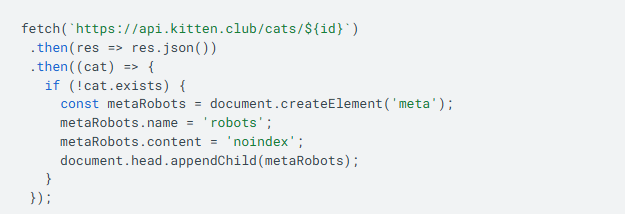
2. Be sure to prevent soft 404 errors. This can be very difficult in single-page applications (SPA). To prevent error pages from being indexed, you can use one or both of the following strategies:
(1) Redirect to a URL where the server responds with a 404 status code.

(2) Add robots meta tags or change them to noindex.

SPAs using client-side JavaScript to handle errors typically report a 200 HTTP status code instead of the corresponding status code. This causes error pages to be indexed and may appear in search results.
3. Googlebot may reject user permission requests.
Features requiring user permissions are not suitable for Googlebot or all users. For example, if you need the Camera API, Googlebot cannot provide a camera to you. In this case, you should provide users with a way to access your content without granting camera access.
4. Do not use fragment URLs to load different content.
SPAs may use fragment URLs (such as https://example.com/#/products) to load different views. Since 2015, the AJAX crawling scheme has been deprecated, so you cannot provide fragment URLs for Googlebot to crawl. We recommend using the History API to load different content based on URLs in SPAs.
5. Don't rely on data persistence to provide content.
Like regular browsers, WRS loads each URL and executes server and client redirects. However, during page loading, WRS does not retain state:
(1) During page loading, data in local storage and session storage is cleared.
(2) During page loading, HTTP cookies are cleared.
6. Use content fingerprinting to avoid Googlebot caching issues.
Googlebot actively caches content to reduce network requests and resource usage. WRS may ignore cache headers. This may cause WRS to use outdated JavaScript or CSS resources. To avoid this issue, you can create content fingerprints that become part of the filename (such as main.2bb85551.js). Fingerprints depend on the file's content, so each update generates a different filename.
7. Ensure your application uses feature detection for all critical APIs it requires and provides fallback behavior or polyfills where applicable.
Some web features may not be adopted by all user agents, and some user agents may deliberately disable specific features. For example, if you use WebGL to render photo effects in browsers, feature detection will show that Googlebot does not support WebGL. To fix this issue, you can skip the photo effects rendering step or use server-side rendering to pre-render photo effects, so that all users (including Googlebot) can access your content.
8. Ensure your content works with HTTP connections.
Googlebot uses HTTP requests to retrieve content from your server. It does not support other types of connections, such as WebSockets or WebRTC connections. To avoid issues with such connections, be sure to provide HTTP fallback mechanisms for retrieving content, and use robust error handling and feature detection mechanisms.
9. Ensure web components render as expected. Use the rich results test or URL inspection tool to check if the rendered HTML contains all the content you expect.
WRS flattens light DOM and shadow DOM. If the web components you use do not use the <slot> mechanism for content within light DOM, please refer to the corresponding web component documentation for details, or use other web components. For more information, see web component best practices.
10. After correcting the content in this checklist, test your web page again using the rich results test or URL inspection tool in Search Console. If the issue is resolved, a green checkmark will be displayed and no errors will be shown.